你是哪個團隊?Which team are you on?
點你的團隊,看你會用到的看板和閱讀順序
Pick your team to see your boards, in reading order
常用任務 · 你今天想做什麼?Common AM Tasks · What do you want to do?
- 新增客戶 LeadAdd a new client lead
- 新增 ContactAdd a contact
- 發起 Agreement / NDAInitiate an agreement or NDA
延伸看板教學Related board guides
Onboarding
5新客戶從建檔、洽談、法務到技術整合,一路到上線。
A new client from first record through deal, legal and integration to go-live.
Product
3遊戲從新增、交付、認證到發行規劃。
Games from intake and delivery through certification and release planning.
AM
7客戶關係、促銷活動與成效追蹤。
Client relationships, promotions and how they performed.
Marketing
2接各團隊的素材需求,產出並交付。
Takes asset requests from other teams, produces and delivers them.
常用任務Common AM Tasks
你今天想做什麼?選一個任務,從起點做到完成。What do you want to do today? Choose a task and follow it from start to finish.
- 新增客戶 LeadAdd a new client lead
- 新增 ContactAdd a contact
- 發起 Agreement / NDAInitiate an agreement or NDA
各任務下方提供完整看板教學連結;未確認的公司流程會標示「待確認」。Each task links to the full board guides. Unconfirmed company processes are marked “To confirm”.
新增客戶 LeadAdd a new client lead
從哪裡開始Where to start
從 Profile 開始,先搜尋公司是否已存在。Start in Profile and search for the company first.
操作步驟Step 1–4
Step 1 · 搜尋公司與 StudioStep 1 · Search the company and Studio
在 Profile 搜尋公司全名,並到 Leads & Deals 確認同公司、同 Studio 是否已有 Lead;已有資料就沿用。Search the full company name in Profile, then check Leads & Deals for a Lead for the same company and Studio. Use the existing records if found.
Step 2 · 建立或補齊 ProfileStep 2 · Create or complete the Profile
公司不存在才新增 Profile。填 Client(公司全名)、Route、Is Aggregator、Is Operator;Route = Via 時另填 Via。Create a Profile only if the company is missing. Fill Client (full company name), Route, Is Aggregator and Is Operator; also fill Via when Route = Via.
Step 3 · 依 Studio 觸發 LeadStep 3 · Trigger the Lead for the Studio
確認沒有相同 Lead 後,把對應的 Add VVD Lead 或 Add IDG Lead 設為 Approached。不要重複觸發。After checking that the Lead does not already exist, set the matching Add VVD Lead or Add IDG Lead to Approached. Do not trigger it repeatedly.
Step 4 · 確認 Lead 並補商機資料Step 4 · Check the Lead and complete deal details
到 Leads & Deals 找系統建立的項目,核對公司與 Studio,填 Priority、Agreement Type、Case Owner,並依實際進度確認 Lead/Deal。Find the automatically created item in Leads & Deals, verify company and Studio, fill Priority, Agreement Type and Case Owner, and check Lead/Deal against actual progress.
完成判斷How to know you’re done
Leads & Deals 找得到正確公司與 Studio 的 Lead,已連回 Profile,且 Priority、Agreement Type、Case Owner 已核對。此任務的完成判斷是 Lead 建立,不以 Client 建檔或 Kickoff 為條件。The Lead for the correct company and Studio is visible in Leads & Deals, linked to Profile, with Priority, Agreement Type and Case Owner checked. This task is complete when the Lead is created; Client creation and Kickoff are not completion criteria.
常見卡點Common blockers
- Lead 沒出現:核對 Studio、Approached 與必填資料,請看板負責人查自動化;不要重按或手動補建重複 Lead。Lead missing: check Studio, Approached and required data, then ask the board owner to check automation. Do not retrigger or manually create a duplicate Lead.
- 待確認:Client 的實際建立時機。不要為了讓 Client 出現而提前改成 Deal。To confirm: when Client records are actually created. Do not move a Lead to Deal just to produce a Client record.
延伸看板教學Related board guides
新增 ContactAdd a contact
從哪裡開始Where to start
從 Contacts 開始;先查聯絡人是否已存在,以及公司能否連到 Client。Start in Contacts; first check for an existing contact and whether the company can be linked to Client.
操作步驟Step 1–4
Step 1 · 查重並確認公司Step 1 · Check duplicates and company
用姓名、E-mail 與公司確認是否已有聯絡人;已有就更新原資料。確認 link to Client 可找到正確公司。Check name, E-mail and company for an existing contact; update the existing record if found. Confirm that link to Client can find the correct company.
Step 2 · 新增並填聯絡方式Step 2 · Add the contact and contact details
公司可連結時,在 Contacts 新增聯絡人,填 Contact Name、Title、E-mail 與已知聯絡管道,並核對 Active。若公司仍在 Lead 階段且找不到 Client,先依下方待確認提示處理。When the company can be linked, add the contact in Contacts, fill Contact Name, Title, E-mail and known contact channels, and check Active. If the company is still a Lead with no Client record, follow the pending-process note below first.
Step 3 · 設定通知與主要窗口Step 3 · Set notifications and primary contact
依實際職責選 Notifications 分類。設定 Main Contact 前先查看該公司現有主要窗口,確認最後僅一位為 Yes;不要假設系統會替換原窗口。Select Notifications categories according to the contact’s responsibilities. Before setting Main Contact, check the company’s current primary contact and ensure only one is Yes; do not assume automatic replacement.
Step 4 · 連結並核對Step 4 · Link and verify
在 link to Client 選正確公司,再核對姓名、E-mail、Active、Notifications 與 Main Contact。Select the correct company in link to Client, then verify name, E-mail, Active, Notifications and Main Contact.
完成判斷How to know you’re done
Contacts 找得到聯絡人,聯絡資料與通知分類正確,已連到正確 Client,且公司主要窗口沒有重複。若 Client 尚不存在,此流程仍待確認,不視為完成。The contact is visible in Contacts with correct details and notification categories, linked to the correct Client, with no duplicate primary contact. If the Client does not exist, the process is still pending confirmation and is not complete.
常見卡點Common blockers
- 待確認:Lead 階段的 Contact 要放在哪裡、何時連到 Client。找不到 Client 時先請看板負責人確認,不要自行建立 Client 或提前改 Deal。To confirm: where to record contacts during the Lead stage and when to link them to Client. If Client is missing, ask the board owner first; do not create a Client or move the Lead to Deal as a workaround.
- Notifications 供其他看板寄信時選收件人;現有教學未確認改標籤是否立即寄信。若擔心觸發通知,先確認自動化設定。Notifications categories are used by other boards to select recipients. The existing guide does not confirm whether changing a tag immediately sends mail; check the automation settings if this is a concern.
延伸看板教學Related board guides
發起 Agreement / NDAInitiate an agreement or NDA
從哪裡開始Where to start
先到 Legal WIP for BD/AM 找該公司與 Studio 的 NDA/Agreement 項目;找不到時回 Leads & Deals 確認 Kickoff 紀錄。First look for the company and Studio’s NDA / Agreement item in Legal WIP for BD/AM. If missing, check the Kickoff record in Leads & Deals.
操作步驟Step 1–4
Step 1 · 確認項目與 KickoffStep 1 · Check the item and Kickoff
已有項目就沿用。尚未 Kickoff 時,先確認本案適用的啟動方式;既有 Kickoff 會連帶建立法務與 Integration 項目,不能假設只開 NDA/Agreement。已觸發卻找不到資料時,請看板負責人查核,不要重按。Use the existing item if present. If Kickoff has not happened, confirm the appropriate initiation route first: the documented Kickoff creates Legal and Integration items, so do not assume it starts only NDA / Agreement. If already triggered but missing, ask the board owner to investigate; do not click again.
Step 2 · 選對文件並整理需求Step 2 · Select the document and prepare the request
核對 Client、Studio、Deal Owner 與 Task(NDA 或 Agreement)。整理此次需要客戶文件審閱,或需要 Legal 起草,以及背景與需求。Verify Client, Studio, Deal Owner and Task (NDA or Agreement). Clarify whether this is a review of a client-provided document or a request for Legal to draft one, including background and requirements.
Step 3 · 準備檔案或確認起草方式Step 3 · Prepare the file or confirm the drafting route
客戶有文件:上傳到對應 NDA File/Agreement File。需要 Legal 起草而沒有文件:先向 Legal 確認提交方式與必備資料;是否一定要附檔仍待確認,確認前不要直接套用送審步驟。If the client provided a document, upload it to NDA File / Agreement File as appropriate. If Legal must draft it and no file exists, confirm the submission route and required information with Legal first. Whether an attachment is mandatory remains unconfirmed; do not apply the review handoff step until clarified.
Step 4 · 轉交並確認接續Step 4 · Hand off and verify follow-through
文件審閱資料齊備後,將對應項目的 Status 設為 Process by Legal。起草需求則依 Legal 確認的方式提交。核對狀態與檔案,並向 Legal 確認案件已接續;不要自行修改 Legal 專用看板。When review materials are ready, set the corresponding item’s Status to Process by Legal. For drafting, follow the route confirmed by Legal. Check status and files and confirm with Legal that the request has been taken up; do not edit the Legal-only board yourself.
完成判斷How to know you’re done
正確公司/Studio 的 NDA 或 Agreement 已依確認的方式轉交;文件審閱案顯示 Process by Legal 且檔案正確,並已確認 Legal 接續。這代表發起完成,不代表文件簽署完成。待確認的 Kickoff/起草規則尚未釐清時,仍屬待處理。The NDA or Agreement for the correct company / Studio has been handed off through the confirmed route. Review requests show Process by Legal with the correct file, and Legal follow-through has been confirmed. This completes initiation, not signing. Unresolved Kickoff or drafting rules mean the request is still pending.
常見卡點Common blockers
- 待確認:僅需 NDA/Agreement 時是否可用 Kickoff、如何處理連帶建立的 Integration 項目。請先與流程負責人確認,不要自行將其他程序設為 Not Required。To confirm: whether Kickoff applies to NDA / Agreement-only requests and how to handle the Integration items it also creates. Ask the process owner first; do not independently mark other processes Not Required.
- 待確認:Legal 起草是否一定要附檔,以及無檔案時的提交方式。既有教學的附檔說明不應直接視為所有起草情境的規則。To confirm: whether Legal drafting always requires an attachment and how to submit without one. The attachment instructions in the existing guide should not be treated as a confirmed rule for every drafting case.
延伸看板教學Related board guides
3 步驟上手
Get going in 3 steps
這個網站怎麼用
How to use this site
- 左側選單=我們 monday 的四個工作區(Onboarding/Product/AM/Marketing),每個底下是它的看板。點看板看操作說明。Left sidebar = our four monday workspaces (Onboarding / Product / AM / Marketing), each with its boards. Click a board for its guide.
- 右上角可切換 中文 / EN 與 深色 / 淺色。Top-right toggles 中文 / EN and dark / light.
- 上方搜尋框可用關鍵字找任何內容;主流程頁有每個工作區的流程圖。Search box up top finds anything by keyword; the Main Flow page has a flow diagram for each workspace.
- 卡住了就看 常見問題 FAQ,或詢問同團隊人員,也可詢問 Claire。Stuck? Check the FAQ, ask someone on your team, or ask Claire.
先懂幾個 monday 名詞
A few monday words first
Workspace 工作區 › Board 看板 › Group 群組 › Item 項目 › Subitem 子項目;每一直行是 Column 欄位,有顏色、點一下就能選的是 Status 狀態。
Workspace › Board › Group › Item › Subitem; each column is a Column, and the coloured click-to-pick cells are Status.
找到你的團隊
Find your team
點你所屬的團隊,看你會用哪些看板、從哪一個開始。點看板名稱可直接跳到它的教學。各看板誰能編輯、誰只能看,見「使用權限」。
Click your team to see which boards you use and where to start. Click a board name to jump to its guide. Who can edit or only view each board is on Permissions.
畫面長這樣What the screen looks like
下圖是 monday 的實際看板畫面(以 Profile 為例),數字對應下方說明。
A real monday board (Profile). Numbers match the list below.
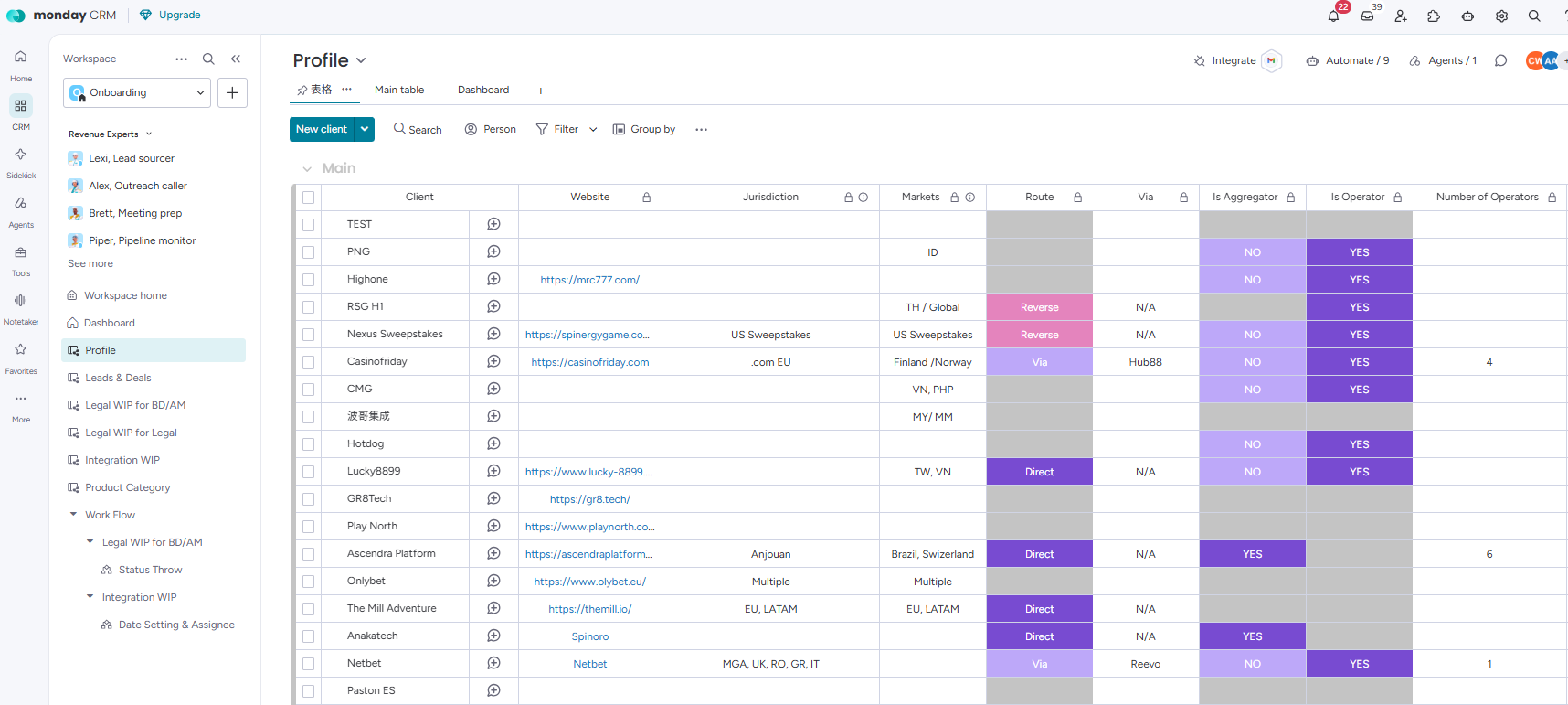
- 左側選單:工作區(Workspace,最上層分類,我們有 4 個)和底下的看板(Board)。我的工作收在最下面的「More/更多」裡。Sidebar: the workspace (the top-level grouping; we have 4) and its boards. My work sits under "More" at the bottom.
- 上方列:🔔 通知(被 @、被指派、自動化寄的提醒都在這)、🔍 搜尋全部內容。Top bar: 🔔 notifications (mentions, assignments, automation reminders) and 🔍 search everything.
- 工具列:新增項目的藍色按鈕(名稱依看板而定,Profile 叫 New client)、Search 搜尋、Person 只看某人、Filter 篩選、Group by 分組。Toolbar: the blue add button (its name depends on the board; on Profile it's New client), Search, Person, Filter and Group by.
- 群組 Group:看板裡的分段,例如這裡的 Main。很多看板會依狀態自動把項目搬到別的群組。Group: a section of the board, like Main here. Many boards move items between groups automatically.
- 項目 Item:一列就是一件事,這裡一列是一個客戶。點名稱或旁邊的對話圖示可以打開項目、寫 Update。Item: one row = one thing; here, one client. Click its name or the speech-bubble icon beside it to open it and post an Update.
- 欄位 Column:每一直行記一種資訊。有顏色的格子是 Status,點一下從清單選。Column: each column holds one kind of info. Coloured cells are Status; click to pick from a list.
每天會用到的 8 個動作8 things you'll do every day
1找到看板Find a board
- 左側選單展開工作區,點看板名稱。
- 或用上方 🔍 搜尋看板名稱。
- 常用的看板按 ☆ 加到 Favorites,下次一點就到。
- Expand a workspace in the sidebar and click the board.
- Or search for it with 🔍 at the top.
- Star ☆ the ones you use most to add them to Favorites.
2新增一個項目Add an item
- 在群組最下面的「+ Add item」打名稱,按 Enter。
- 或點工具列的 New item(新增到最上面的群組)。
- Type a name into "+ Add item" at the bottom of a group and press Enter.
- Or click New item in the toolbar (adds to the top group).
3填欄位、改狀態Fill in columns and statuses
- 點格子直接打字。
- Status:點一下,從顏色清單選。
- 人(People):點頭像選人;日期:點了選日期。
- 欄位名稱下面有「🔒 來自 ○○」這一行的,是從那張看板帶過來的資料,要到那張看板改。
- Click a cell and type.
- Status: click and pick from the coloured list.
- People: click the avatar to pick someone. Date: click to choose a date.
- A column with "🔒 from …" under its name shows data from that board; change it there.
4寫 Update、@ 同事Post an Update and @-mention
- 點項目名稱或 💬,打開項目,在 Updates 分頁寫進度。
- 打 @名字 就會通知對方。
- 檔案可以直接拖進 Update 裡附上。
- 跟這件事有關的討論盡量寫在 Update,之後接手的人才查得到。
- Click the item name or 💬 to open it, then write in the Updates tab.
- Type @name to notify someone.
- Drag files straight into an Update to attach them.
- Keep discussion about the item in its Updates so whoever takes over can find it.
5看通知Check notifications
- 上方 🔔:被 @、被指派、自動化寄的提醒都在這。
- 很多自動化也會同時寄 email,統一以 no-reply <no-reply@edm.vividgaming.info> 寄出,請留意信箱。
- 手機 App 也能收通知,可依需求安裝。
- 🔔 at the top: mentions, assignments and automation reminders.
- Many automations also send email, always from no-reply <no-reply@edm.vividgaming.info>, so keep an eye on your inbox.
- The mobile app gets notifications too. Install it as needed.
6找資料:搜尋與篩選Find things: search and filter
- 工具列 Search:在這張看板裡找關鍵字。
- Person:只看指派給某人的項目。
- Filter:依欄位條件篩(例如 Studio = VVD);Sort:排序。
- 篩選只改變你看到的畫面,不會改到資料。
- Toolbar Search: find a keyword on this board.
- Person: show only one person's items.
- Filter by column values (e.g. Studio = VVD); Sort to reorder.
- Filtering changes only what you see, never the data.
7善用「我的工作」Make good use of My Work
- 一頁看完所有看板上指派給你的事。
- 項目要有指派你、而且有日期欄才會出現。
- 詳細說明看「我的工作」。
- Everything assigned to you across all boards, on one page.
- An item shows up only if you're assigned and it has a date column.
- Details in My Work.
8改錯了怎麼辦If you change something by mistake
- 刪除、移動等操作後,畫面下方會短暫出現「Undo」,馬上點就能復原。
- 欄位改錯:打開項目的 Activity Log,看原本的值再改回去。
- 改到會觸發自動化的欄位(例如 Kickoff),先問看板負責人再處理。
- After deleting or moving something, an "Undo" prompt appears briefly at the bottom. Click it straight away.
- Wrong value in a column: open the item's Activity Log, find the old value, set it back.
- If you changed a column that triggers automations (e.g. Kickoff), ask the board owner before fixing it.
團隊與角色Teams and roles
| 名詞Term | 意思Meaning |
|---|---|
| BD Business Development 業務開發 | 推動公司長期業務成長:建立策略合作、拓展新市場、開發新客戶,並負責行銷與展會。Drives long-term business growth: strategic partnerships, market expansion, client acquisition, and marketing and expos. |
| AM Account Management · Client Success 客戶成功 | 確保客戶達成想要的成果:協助客戶導入與上線、定期業務檢討、推動產品使用與促銷、發掘加購機會、管理客戶流失風險。Makes sure clients achieve the outcomes they want: guiding onboarding and implementation, business reviews, product adoption and promotions, upsell opportunities and churn-risk management. |
| PMO Project Management Office 專案管理 | 負責團隊治理、資源調配與策略對齊:跨部門專案與問題、遊戲翻譯與認證、工作流程管理(CRM、遊戲開發/認證/發行等)、團隊績效與效率,以及新計畫推動。Team governance, resource optimisation and strategic alignment: cross-department projects and issues, game translation and certification, workflow management (CRM, game development / certification / releases), team performance and efficiency, and new initiatives. |
| RD R&D 研發 | 研發工程人員,分兩種:AM 的 RD 負責促銷後台設定;Tech team 的 RD 負責技術串接。Engineers, in two groups: AM's RD sets up promo back-ends; the Tech team's RD handles technical integration. |
| TCS Technical Customer Support 技術客服 | 協助客戶處理技術問題的技術支援人員。Technical support staff who help clients with technical issues. |
公司與客戶Company and clients
| 名詞Term | 意思Meaning |
|---|---|
| VVD / IDG Vivid Gaming / Ideal Gaming | 公司的兩個遊戲品牌(Studio)。同一個客戶可以分別跟兩個 Studio 洽談,所以 Profile 有 Add VVD Lead/Add IDG Lead 兩個按鈕。Our two game brands (Studios). A client can talk to each Studio separately, which is why Profile has both Add VVD Lead and Add IDG Lead. |
| Operator | 營運商:經營線上娛樂網站、直接面對玩家的公司。Profile 的 Is Operator = YES 代表客戶是營運商。A company that runs an online gaming site and serves players directly. Is Operator = YES in Profile marks a client as one. |
| Aggregator | 聚合平台:把多家遊戲商的遊戲整合起來,再提供給很多營運商。Is Aggregator = YES 代表客戶是聚合平台;No. of Operators 記它串了幾家。A platform that bundles many providers' games and passes them on to many operators. Is Aggregator = YES marks a client as one; No. of Operators counts its operators. |
| B2B / B2C | Agreement Type(合約模式)的選項:B2B、B2C,或兩者皆有(B2B+B2C)。Agreement Type options: B2B, B2C, or both (B2B+B2C). |
流程與業界用語Process and industry terms
| 名詞Term | 意思Meaning |
|---|---|
| WIP Work in Progress 進行中 | 看板名稱裡的 WIP(Legal WIP、Integration WIP、Certification WIP)代表「追蹤進行中案子」的看板。Boards named "… WIP" track cases that are still under way. |
| NDA | 保密協議。還沒成交前,就可以先在 Leads & Deals 走 NDA。Non-disclosure agreement. Can be done in Leads & Deals before a deal is confirmed. |
| DD Due Diligence 盡職調查 | 簽約前,對合作對象的公司背景、財務、合規與牌照等做查核,確認合作風險。分兩種:我方審查對方(DD we review),以及對方審查我方(DD client review)。Before signing, checking a partner's company background, finances, compliance and licences to judge the risk. Two kinds: we review them (DD we review) and they review us (DD client review). |
| Go Live | 客戶或遊戲正式上線。A client or game is officially live. |
| ETA | 預計完成日,例如 QA ETA、Certification ETA。Estimated date of completion, e.g. QA ETA, Certification ETA. |
| QA | 品質測試。Game Delivery 填了 QA ETA,系統會自動建立認證項目(VVD)。Quality assurance. Filling QA ETA in Game Delivery auto-creates a certification item (VVD). |
客戶、遊戲、編號和日期都是虛構範例。
The client, game, IDs and dates are all made up.
第一段:新客戶上線Part 1: Bringing a new client live
-
- 新增項目 Sample Casino,填必填欄位:Route = Direct、Is Operator = YES、Is Aggregator = NO;Jurisdiction 填 MT。Add the item Sample Casino and fill the required fields: Route = Direct, Is Operator = YES, Is Aggregator = NO; Jurisdiction = MT.
- 準備開始談 VVD 的遊戲,把 Add VVD Lead 設為 Approached。Ready to talk about VVD games: set Add VVD Lead to Approached.
⚡ Leads & Deals 自動出現一筆 VVD 的 Lead,客戶名、Route、Studio 等資料都帶好了。A VVD Lead appears in Leads & Deals with the client name, Route, Studio and more already filled in. -
- 填 Priority = High、Agreement Type = B2B,Case Owner 選自己。Set Priority = High and Agreement Type = B2B, and make yourself Case Owner.
- 隨洽談進度更新狀態:Lead → In Discussion → Deal。Move the status along as talks progress: Lead → In Discussion → Deal.
- 資料都確認後,按 Kickoff(Initiate)。只能按一次。Once everything is checked, press Kickoff (Initiate). Press it once only.
⚡ Lead/Deal Date 依狀態自動填;按下 Kickoff 後,Legal WIP for BD/AM、Legal WIP for Legal、Integration WIP 都自動建立 Sample Casino 的項目。Lead / Deal Date fill in by status; Kickoff creates Sample Casino items in Legal WIP for BD/AM, Legal WIP for Legal and Integration WIP. -
- Sample Casino 有 4 列文件:NDA、Agreement、DD (we review)、DD (client review)。要法務處理的設為 Process by Legal,並上傳 NDA/Agreement 檔案。Sample Casino has 4 document rows: NDA, Agreement, DD (we review), DD (client review). Set the ones Legal should handle to Process by Legal and upload the NDA / Agreement files.
- Sample Casino 是 VVD 客戶,NDA、Agreement、DD (we review) 不能設 Not Required。Sample Casino is a VVD client, so NDA, Agreement and DD (we review) can't be Not Required.
⚡ 設為 Process by Legal 的文件,狀態會拋轉到 Legal WIP for Legal。Documents set to Process by Legal flow over to Legal WIP for Legal. -
- 收到的文件已帶好初始狀態(例如 NDA 是 Reviewing、Agreement 是 Drafting),依進度把每一份推到 Completed。Documents arrive with a starting status (e.g. NDA is Reviewing, Agreement is Drafting); move each one to Completed as work progresses.
- 進度和卡點寫在子項目 Comment from Legal,BD/AM 在自己的看板就看得到。Post progress and blockers in the Comment from Legal subitem so BD/AM can see them from their board.
⚡ 四份都完成後,Completeness 自動變成 Total Completed,項目移到 Completed 群組。When all four are done, Completeness turns Total Completed and the item moves to the Completed group. -
- Tech team 依進度切換 Integration Status:1. Integration Preparation → 2. Integration & Testing → 3. Final Acceptance to Live。The Tech team moves Integration Status along: 1. Integration Preparation → 2. Integration & Testing → 3. Final Acceptance to Live.
- AM 負責最終驗收,客戶正式上線時設為 4. Go Live。The AM handles final acceptance and sets 4. Go Live when the client launches.
⚡ 每個階段自動填日期並指派負責人(Route = Direct,測試由 TCS 負責);Live Date 會出現在 Client 看板的 Go Live Date。Each stage stamps its date and sets the assignee (Route = Direct, so TCS handles testing); Live Date shows up as Go Live Date on the Client board. -
- 客戶上線後,在 Client 看板確認 Sample Casino 的客戶檔:補齊公司登記(Registered name、VAT Number、Jurisdiction)、付款幣別與條件,並指派 BD/AM。Once the client is live, check Sample Casino's record on the Client board: complete the registration details (registered name, VAT number, Jurisdiction), payment currency and terms, and assign BD / AM.
- Commercial Terms 是機密欄位,不要截圖或外流。Commercial Terms is confidential: don't screenshot or share it.
⚡ 新客戶自動設為 Client Status = Active、Client Priority = Medium;Go Live Date 從 Integration WIP 帶入。New clients default to Client Status = Active and Client Priority = Medium; Go Live Date comes in from Integration WIP. -
- 新增客戶窗口,填 email、Telegram 等聯絡方式,標一位 Main Contact,並連到 Client 的 Sample Casino。Add the client's contacts with email, Telegram and so on, mark one Main Contact, and link them to Sample Casino on Client.
- Notifications 勾這個人要收的通知類型(例如 Promo、Financial),最多 4 個。Tick which notifications each person gets in Notifications (e.g. Promo, Financial), up to 4.
⚡ 之後其他看板寄信時,會依 Notifications 的分類找收件人。When other boards send email later, they pick recipients by these Notifications tags.
第二段:幫客戶辦一檔促銷Part 2: Running a promo for the client
-
- 新增促銷:選 Promotion Type(例如 Tournament Sponsor),填 Operator/Site、Games、Start/End Date,Responsible AM 選自己。Add a promo: pick a Promotion Type (e.g. Tournament Sponsor), fill in Operator / Site, Games and Start / End Date, and make yourself Responsible AM.
- 從項目上的連結送出 RD Request Form(後台設定)和 Marketing Request Form(素材)。Send the RD Request Form (backend setup) and Marketing Request Form (creative) from the links on the item.
⚡ 系統自動產生 Promo ID(例如 P0042)並用它命名;Promo Period 依日期自動產生。The system assigns a Promo ID (e.g. P0042) and names the item with it; Promo Period builds itself from the dates. -
- AM 的 RD 依帶進來的需求完成後台設定(例如 Lucky Wheel),把 RD Set Up Status 改成 Completed。AM's RD completes the backend setup from the request that came in (e.g. a Lucky Wheel) and sets RD Set Up Status to Completed.
⚡ RD Request Form 送出後,這裡自動建立項目、帶入表單內容並寄信給 RD;改成 Completed 後,Promo 的 RD Set Up Confirm 關卡就過了。Submitting the RD Request Form creates the item here with the form data and emails RD; Completed clears the RD Set Up Confirm gate on Promo. -
- Marketing 收到需求,指派 Task Owner,製作素材(例如 Banner)。Marketing receives the request, assigns a Task Owner and produces the creative (e.g. a banner).
- 完成後填 Assets Path(檔案位置),Task Status 改成 Completed。When done, fill in Assets Path (the file location) and set Task Status to Completed.
- Promo 上的兩個關卡(RD Set Up Confirm、Marketing Assets)都變 Yes 後,促銷就可以上線。Once both gates on Promo (RD Set Up Confirm, Marketing Assets) are Yes, the promo can go live.
⚡ 表單送出時自動通知 Marketing;填了 Assets Path 會自動寄信告訴 AM 素材好了。Submitting the form notifies Marketing; filling Assets Path emails the AM that the creative is ready. -
- 促銷到 End Date 結束,你會收到通知信,提醒你填 Promo Outcome。When the promo reaches its End Date you get an email reminding you to set the Promo Outcome.
- 在 Promo Analysis 找到 P0042,等 Status 變成 Completed(數據進來了)。Find P0042 in Promo Analysis and wait for Status to reach Completed (the figures are in).
- 看 Players/Bets/GGR,依參考價值選 Promo Outcome,在 Comments 寫原因和客戶偏好。Read Players / Bets / GGR, pick the Promo Outcome by learning value, and write the reason and client preferences in Comments.
⚡ Players/Bets/GGR 與 % 變化由外部程式自動填,Baseline 自動計算;促銷結束時,活動自動移到 Promo 的 Finished 群組。Players / Bets / GGR and the % changes are filled by an external program and the baseline is calculated; at the end, the promo moves to Promo's Finished group.
第三段:客戶要一張跟促銷無關的素材Part 3: Artwork that isn't for a promo
-
- 新增項目,填 Aggregator、Operator、Site、Studio、Responsible AM、Art Request Type(例如 Game Thumbs)、Art Request Note、Games。Add an item and fill in Aggregator, Operator, Site, Studio, Responsible AM, Art Request Type (e.g. Game Thumbs), Art Request Note and Games.
- 點 Marketing Request Form 連結送出;Art Team 完成後,用通知信裡的連結取回檔案(NAS 或 Google Drive)。Submit via the Marketing Request Form link; when the Art Team is done, collect the files from the link in the email (NAS or Google Drive).
⚡ Task ID(例如 A-00015)自動產生;送出後在 Request by AM 建立需求並寄 Outlook 通知;Art Request Status 每小時跟 Request by AM 同步,不用手動改。A Task ID (e.g. A-00015) is assigned; submitting creates the request on Request by AM and sends Outlook emails; Art Request Status syncs with Request by AM every hour, so you never edit it.
第四段:新遊戲搶先開放給這個客戶Part 4: A new game, early access for the client
-
- 新增遊戲 Golden Tiger(VVD),依交付步驟推進,並填 QA ETA 與 Demo URL。Add the game Golden Tiger (VVD), work through the delivery steps, and fill in QA ETA and Demo URL.
⚡ Delivery Stage 推進時自動展開子項目;填 QA ETA 會在 Certification WIP 建立認證項目(VVD);填 Demo URL 會在 Roadmap 建立項目。Advancing Delivery Stage creates the step subitems; QA ETA creates a Certification WIP item (VVD); Demo URL creates a Roadmap item. -
- 選 Testlab(例如 GLI),填 Certification ETA;用子項目追每個市場,用不到的設 Not Required。Pick the Testlab (e.g. GLI) and set Certification ETA; track each market in subitems and set Not Required where it doesn't apply.
⚡ 新增時自動依市場建立子項目;填 ETA 後主狀態變 In Progress,ETA 當天自動變 Completed;ETA 同步到 Game Delivery 與 Roadmap。Market subitems are created automatically; setting the ETA turns status In Progress and the ETA date turns it Completed; the ETA syncs to Game Delivery and Roadmap. -
- 設定 Quarter(例如 2026 Q4),確認 Demo;排定後按 Finalize。Set the Quarter (e.g. 2026 Q4) and check the demo; once scheduled, press Finalize.
- Finalize 會把 Release Date 設成按下的那天,排程沒定前不要按。Finalize sets Release Date to the day you press it, so don't press it before the schedule is fixed.
⚡ 新遊戲自動連到 Certification WIP 對應的認證項目。The new game links to its Certification WIP item automatically. -
- 連結 Golden Tiger,製作宣傳影片與素材包,把連結放進 Link/Asset pack on drive/Game Sheet。Link Golden Tiger, produce the promo video and asset pack, and put the links in Link / Asset pack on drive / Game Sheet.
- Video Status 與 Game Completeness 都更新到完成。Bring both Video Status and Game Completeness to done.
⚡ Game Completeness 變 Total Completed 時,項目自動移到 Completed 群組。When Game Completeness reaches Total Completed, the item moves to the Completed group. -
- 新增項目,Game Name 選 Golden Tiger;填 Studio = VVD、Pre-release Client = Sample Casino、Pre-release Market = MT、Pre-release Date。Add an item and pick Golden Tiger as Game Name; fill in Studio = VVD, Pre-release Client = Sample Casino, Pre-release Market = MT and Pre-release Date.
- 開放給客戶時把狀態改成 Opened,正式發行後改成 Released。Set the status to Opened when the client gets access, then Released after the official launch.
⚡ Game ID、Planned Release Date、Certification ETA 自動帶入。Game ID, Planned Release Date and Certification ETA fill in automatically.
點開下面每個工作區,看它的目的、說明與流程圖。預設收合,點一下展開。
Open each workspace below to see its purpose, details and flow diagram. Collapsed by default — click to expand.
🚀Onboarding
※ 個案:客戶尚未確認 Deal 前,可先在 Leads & Deals 執行 NDA。
※ Edge case: the NDA can be run in Leads & Deals before the Deal is confirmed.
② Route = Via 的客戶,Integration 狀態會跟著串接廠商走(例:500 Casino 跟 Hub88)。
② For Route = Via clients, the Integration status mirrors the aggregator (e.g. 500 Casino ↔ Hub88).
🎮Product
📣AM
1. Client & Contacts 建檔1. Client & Contacts setup
2. Promo 與 Promo Analysis2. Promo & Promo Analysis
3. Art Request 美術需求3. Art Request
4. Pre-release List 預先發行4. Pre-release List
5. AM ↔ PM/RD 開發需求5. AM ↔ PM/RD dev requests
🎨Marketing
如何找到我的工作
How to Find My Work
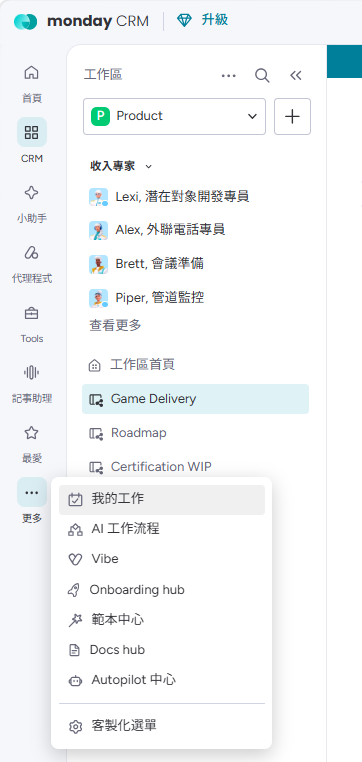
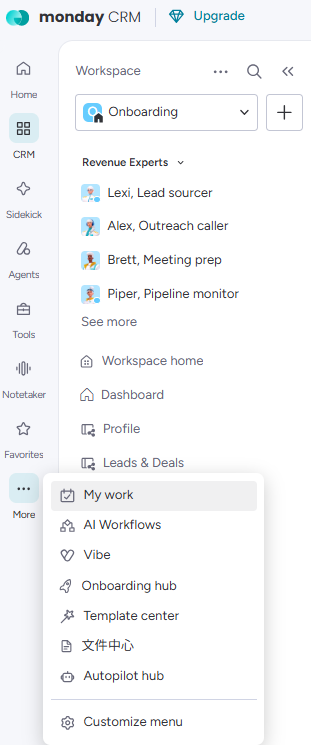
我的工作不一定會直接出現在左側選單,通常要先點左側的「更多」展開才看得到。
很多人找不到,就是因為沒有展開「更多」。
“My Work” may not appear directly in the left menu — usually you must first click “More (⋯)” on the left to reveal it. Most people who can’t find it simply haven’t expanded “More”.
- 在左側選單點「更多」展開。In the left menu, click “More (⋯)” to expand it.
- 選「我的工作」。建議在它上面按右鍵釘選 / 加到最愛,下次就能直接一鍵點開。Pick “My Work”. Tip: right-click to pin / favorite it so it’s one click next time.
它不屬於任何單一看板,是專屬於你個人的彙整頁——每個人看到的內容都不一樣(只會是自己的工作)。
It doesn’t belong to any single board — it’s your personal aggregated view, so everyone sees only their own work.
為什麼要用它
Why use it
- 一頁看完你在所有看板上被指派的工作,不用逐一打開看板。
- 可依個人檢視習慣,至右上角變更模式進行分組。
- 可直接在這裡更新狀態、點進該項目,省去切換看板的時間。
- 只顯示你自己的工作,不會被別人的項目干擾。
- See all your assigned work across every board on one page — no need to open each board.
- Can be grouped by your personal viewing preference, accessible via the top-right corner.
- Update statuses or jump into an item right from here, without switching boards.
- Shows only your own work — you won’t be distracted by other people’s items.
看板操作權限
Board Editing Rights
依工作區分。編輯權限=可編輯該看板的團隊;檢視權限=可查看的對象。以 monday 上的實際設定為準。
Grouped by workspace. Can Edit = teams that can edit the board; Can View = who can see it. Actual access follows the real monday settings.
| 工作區 | Workspace | 看板 | Board | 編輯權限 | Can Edit | 檢視權限 | Can View |
|---|---|---|---|---|---|---|---|
| 🚀 Onboarding | 📋 Profile | BD team AM team | 全部團隊 | All teams | |||
| 🎯 Leads & Deals | BD team AM team | 全部團隊 | All teams | ||||
| ⚖️ Legal WIP for BD/AM | BD team AM team | 全部團隊 | All teams | ||||
| 📑 Legal WIP for Legal | Legal team | 全部團隊 | All teams | ||||
| 🔧 Integration WIP | Tech team | 全部團隊 | All teams | ||||
| 🎮 Product | 🎮 Game Delivery | PMO | 全部團隊 | All teams | |||
| 🗓️ Roadmap | AM team PMO | 全部團隊 | All teams | ||||
| 📜 Certification WIP | PMO | 全部團隊 | All teams | ||||
| 📣 AM | 🏢 Client | BD team AM team | 全部團隊 | All teams | |||
| 📇 Contacts | BD team AM team PMO Marketing team | 全部團隊 | All teams | ||||
| 📣 Promo | AM team | 全部團隊 | All teams | ||||
| 📊 Promo Analysis | AM team | 全部團隊 | All teams | ||||
| ⚙️ RD Set Up | AM team | 全部團隊 | All teams | ||||
| ⚡ Pre-release List | AM team | 全部團隊 | All teams | ||||
| 🎨 Art Request | AM team | 全部團隊 | All teams | ||||
| 🎨 Marketing | 🎬 Request by Game Delivery | Marketing team | 全部團隊 | All teams | |||
| 📥 Request by AM | Marketing team | 全部團隊 | All teams |
系統與權限管理
System & Access
看板操作之外,Monday 的系統設定、自動化與權限開通由 PMO - Claire 負責:
Beyond board editing, Monday's system setup, automations and access provisioning are handled by PMO - Claire:
| 團隊 | Team | 負責範圍 | Responsibilities |
|---|---|---|---|
| PMO - Claire | Monday 問題釐清、流程協調、系統設定、自動化、表格/欄位變更與權限開通;看不到看板或需要開通權限,都找 ClaireMonday questions, workflow coordination, system setup, automations, board/column changes and access provisioning; contact Claire for missing boards or access requests |
| Client → 同步所有看板→ All boards |
Website | Jurisdiction | Markets | Route → 同步 Leads&Deals、Integration→ Leads&Deals, Integration |
Via → 同步 Leads&Deals、Integration→ Leads&Deals, Integration |
Is Aggregator → 同步 Leads&Deals→ Leads&Deals |
Is Operator → 同步 Leads&Deals→ Leads&Deals |
No. of Operators | Comments | Action Points | Latest Update | Add VVD Lead → Leads&Deals(VVD)→ Leads&Deals (VVD) |
Add IDG Lead → Leads&Deals(IDG)→ Leads&Deals (IDG) |
|
|---|---|---|---|---|---|---|---|---|---|---|---|---|---|---|
| Whale IO | whale.io | Crypto | Global | Via | Hub88 | NO | YES | 1 | Follow up on Q3 deal | Awaiting contract review... | Approached | Unapproached | ||
| 101 | CW, KM (Anjouan) | Direct | NO | YES | Unapproached | Unapproached | ||||||||
| 1XBET | 1xbet.com | CW | CW | Direct | NO | YES | Unapproached | Unapproached |
1可操作人員Who can edit
- BD team主要維護者:建立客戶、判斷 Route 與類型、觸發 Lead。Primary owner — creates clients, sets Route & type, triggers leads.
- AM team共同建立與維護客戶基本資料。Co-creates and maintains client profiles.
2欄位說明Fields
| 欄位Column | 說明What it's for |
|---|---|
| Client | 必填:客戶公司全名,同步到所有看板。Required: full company name, syncs to all boards. |
| Website / Jurisdiction / Markets | 官網;管轄地國碼(ISO alpha-2,如 MT/TW/CW);營運市場。Website; jurisdiction code (ISO alpha-2, e.g. MT / TW / CW); markets. |
| Route | 必填:整合技術路徑(見下),影響後續所有流程。Required: integration path (below); drives all downstream flows. |
| Via | Route = Via 時必填:串接廠商名稱。Required when Route = Via: the vendor's name. |
| Is Aggregator / Is Operator | 必填:客戶類型 YES/NO。No. of Operators:串接廠商數。Required: client type YES / NO. No. of Operators: vendor count. |
| Add VVD Lead / Add IDG Lead | 依 Studio 觸發到 Leads & Deals 建立 Lead(見自動化)。Triggers a Lead in Leads & Deals per Studio (see Automation). |
| Live Stage | Not Yet Live / Go Live:是否已正式上線。Not Yet Live / Go Live. |
| Comments / Action Points / Latest Update | 備註、待辦、最新進度。Notes, to-dos, latest status. |
| Legal WIP / Integration WIP | 連動的後續看板。Linked downstream boards. |
| Subitems | Owner、Status、Date,記客戶相關待辦。Owner, Status, Date for follow-ups. |
Route 整合路徑:
Route integration path:
Via 欄位integrate through a vendor; also fill Via3使用方式How to use
- 新增客戶Add a client
- 填必填欄位Fill the required fields
- 要開始洽談時,依 Studio 點對應按鈕觸發 LeadWhen ready to engage, trigger a Lead by Studio

4自動化邏輯說明Automation
- 一鍵觸發 Lead:把 Add VVD Lead/Add IDG Lead 設為 Approached,系統自動在 Leads & Deals 建立對應 Studio 的 Lead 並連結,同步下列欄位。One-click Lead: set Add VVD/IDG Lead to Approached and the system auto-creates & links a Studio Lead in Leads & Deals, syncing the fields below.
- Route 自動處理 Via:選 Direct/Reverse 自動把 Via 設為 NA;選 Via 會清空 Via 提示你填,未填會通知相關人。Route auto-handles Via: Direct/Reverse sets Via to NA; Via clears it so you fill it, and notifies if left empty.
- Live Stage 自動分組:設為 Go Live 時,客戶自動移到看板下方的 Go Live 群組。Live Stage auto-grouping: set to Go Live and the client moves to the Go Live group.
- Outlook 收發信整合:與客戶往來的信件記錄在看板。Outlook email sync: emails with the client are logged on the board.
觸發後,以下資料自動連動至 Leads & Deals:
These fields then auto-sync to Leads & Deals:
5注意事項Cautions
- 必填欄位:Client、Route、Is Aggregator、Is Operator(Route = Via 時 Via 也必填)。Required: Client, Route, Is Aggregator, Is Operator (plus Via when Route = Via).
- Add Lead 按下會自動建立 Leads & Deals 項目,不要重複觸發或手動另建。Add Lead auto-creates the Leads & Deals item — don't trigger twice or create it manually.
- Jurisdiction 用 ISO alpha-2 國碼(如 MT、TW、CW)。Use ISO alpha-2 codes for Jurisdiction (e.g. MT, TW, CW).
| Client | CID | Profile 🔒 來自 Profile🔒 from Profile |
Route 🔒 來自 Profile🔒 from Profile |
Via 🔒 來自 Profile🔒 from Profile |
Is Agg. 🔒 來自 Profile🔒 from Profile |
Is Oper. 🔒 來自 Profile🔒 from Profile |
Studio 🔒 來自 Profile🔒 from Profile |
Priority ✏️ 同步至 Legal / Integration✏️ → Legal / Integration |
Agreement Type | Case Owner | Deal or Lead | Kickoff ✏️ 觸發流程✏️ triggers flow |
|
|---|---|---|---|---|---|---|---|---|---|---|---|---|---|
| 101 | C-000002 | 101 | NO | YES | IDG | B2B | MA | On Hold | |||||
| 1XBET | C-000004 | 1XBET | Direct | NO | YES | IDG | B2B | AC | Lead | ||||
| 500 Casino | C-000006 | 500 Casino | Via | Hub88 | VVD | B2C | AA | Deal | |||||
| 55Lottery | C-000007 | 55Lottery | Direct | NO | YES | IDG | High | B2B | AC | Deal | |||
| 7softtech | C-000008 | 7softtech | Direct | NO | YES | IDG | B2B | AC | Deal |
1可操作人員Who can edit
- BD team主要維護者:填優先級、合約類型、洽談階段,按 Kickoff。Primary owner — fills priority, agreement type, stage; presses Kickoff.
- AM team共同追蹤洽談進度。Co-tracks the deal progress.
2欄位說明Fields
| 欄位Column | 說明What it's for |
|---|---|
| Client / CID | 客戶名;CID 系統自動編號(C-00002…)。Client; CID auto-numbers (C-00002…). |
| Priority | 必填:Immediate/Urgent/High/Normal/Low,同步至 Legal & Integration。Required: Immediate/Urgent/High/Normal/Low; syncs to Legal & Integration. |
| Agreement Type | 合約模式:B2B/B2C/B2B+B2C。Contract model: B2B / B2C / B2B+B2C. |
| Case Owner | 負責的 BD/AM(單人);即下游的 Deal Owner。Responsible BD/AM (one) — the downstream Deal Owner. |
| Lead/Deal | Lead 潛在/In Discussion/Deal 成交/On Hold。Lead / Deal Date 依階段自動填。Lead / In Discussion / Deal / On Hold. Lead / Deal Date auto-fill by stage. |
| Kickoff | 按鈕,啟動法務與整合流程(見自動化)。Button to start the legal & integration flow (see Automation). |
| Live Stage | Not Yet Live / Go Live。Not Yet Live / Go Live. |
| Route / Via / Is Agg / Is Oper / Studio | 鏡射自 Profile,唯讀。Mirrored from Profile, read-only. |
| Subitems | 上線清單:Approached、NDA、DD、Agreement WIP/Final、Integration、Live。Onboarding checklist: Approached, NDA, DD, Agreement WIP/Final, Integration, Live. |
3使用方式How to use
- 在 Profile 觸發 Lead 後,項目會自動出現在這裡,不用手動新增Once a Lead is triggered in Profile, the item appears here automatically; don't add it by hand
- 填 Priority(必填)、Agreement Type、Case OwnerFill in Priority (required), Agreement Type and Case Owner
- 隨洽談進度更新 Lead/Deal:Lead → In Discussion → Deal(暫停設 On Hold)Move Lead/Deal along as talks progress: Lead → In Discussion → Deal (On Hold if paused)
- 資料確認無誤後按 Kickoff(Initiate),啟動法務與整合流程。只能按一次When everything is correct, press Kickoff (Initiate) to start legal and integration. Press it once only
- 客戶正式上線後,Live Stage 設為 Go LiveOnce the client is live, set Live Stage to Go Live
4自動化邏輯說明Automation
- 階段自動填日期:狀態變 Lead 自動填 Lead Date、變 Deal 自動填 Deal Date。Dates auto-stamp: Lead sets Lead Date, Deal sets Deal Date.
- Kickoff 啟動流程:按下 Initiate,系統自動在 Legal WIP for BD/AM、Legal WIP for Legal、Integration WIP 建立項目並連結、同步下列欄位。Kickoff starts the flow: Initiate auto-creates & links items in Legal WIP for BD/AM, Legal WIP for Legal and Integration WIP, syncing the fields below.
- 成交自動建檔:狀態變 Deal 時,系統自動在 Client 看板建立正式客戶。Deal auto-files: reaching Deal auto-creates the client on the Client board.
- Live Stage 自動分組:設為 Go Live 移到 Go Live 群組。Live Stage auto-grouping: Go Live moves it to the Go Live group.
5注意事項Cautions
- Priority 必填——它會同步到 Legal 與 Integration,影響下游排序。Priority is required — it syncs to Legal and Integration and drives their ordering.
- 紅色欄位(Route/Via/類型/Studio)要改請回 Profile。Change red fields (Route / Via / type / Studio) back in Profile.
| Client 🔒 來自 Leads&Deals🔒 from Leads&Deals |
CID 🔒 來自 Leads&Deals🔒 from Leads&Deals |
Studio 🔒 來自 Leads&Deals🔒 from Leads&Deals |
Deal Owner 🔒 來自 Leads&Deals🔒 from Leads&Deals |
Task ✏️ 每個客戶 4 列✏️ 4 rows per client |
Status ✏️ BD team / AM team 必填✏️ BD team / AM team must fill |
NDA File ✏️ 需要時上傳✏️ upload if needed |
Agreement File ✏️ 需要時上傳✏️ upload if needed |
|
|---|---|---|---|---|---|---|---|---|
| IDG | 1XBET | C-000004 | IDG | AC | NDA | Not Required | ||
| Agreement | Process by Legal | 📎 NDA_1XBET.pdf | ||||||
| DD (we review) | Not Started | |||||||
| DD (client review) | Not Started | |||||||
| VVD | 500 Casino | C-000006 | VVD | AA | NDA | Not Started | ||
| Agreement | Not Started | |||||||
| DD (we review) | Not Started | |||||||
| DD (client review) | Not Started | |||||||
| IDG | 7softtech | C-000008 | IDG | AC | NDA | Not Required | ||
| Agreement | Not Required | |||||||
| DD (we review) | Not Required | |||||||
| DD (client review) | Not Required |
1可操作人員Who can edit
- BD team主要維護者:為四項文件選 Status、上傳檔案。Primary owner — sets Status for the four docs and uploads files.
- AM team共同處理合約文件。Co-handles the documents.
2欄位說明Fields
| 欄位Column | 說明What it's for |
|---|---|
| Task | 四項文件:NDA、Agreement、DD (we review)、DD (client review)。Four docs: NDA, Agreement, DD (we review), DD (client review). |
| Status | Not Started/Process by Legal(轉交法務)/Not Required/On Hold。Not Started / Process by Legal / Not Required / On Hold. |
| NDA File / Agreement File | 上傳對應文件(轉法務時需附上)。Upload the file (attach when handing to Legal). |
| Client / CID / Studio / Deal Owner | 鏡射自 Leads & Deals,唯讀。Mirrored from Leads & Deals, read-only. |
| Status 選項Status | 意義Meaning | 需要的動作Action |
|---|---|---|
| Process by Legal | 已轉法務團隊處理Sent to the Legal team | ⚠️ 需上傳 NDA/Agreement 檔案⚠️ Upload the NDA / Agreement file |
| Not Required | 此客戶不需要此程序Not needed for this client | — |
| Not Started | 尚未開始Not yet begun | — |
3使用方式How to use
- 每個客戶 4 項各選 StatusPick a Status for each of the 4 docs
- 需要的上傳檔案Upload files as needed
- 轉法務Hand to Legal
4自動化邏輯說明Automation
- 自動建立資料:Leads & Deals 按 Kickoff 後,系統自動在此為每個客戶建立 4 列(NDA/Agreement/DD×2)。Auto-created rows: after Kickoff on Leads & Deals, 4 rows per client (NDA / Agreement / DD×2) are created here.
- VVD 合規保護:VVD 客戶的文件若被設為 Not Required,系統會自動改回 Not Started 並通知你(僅 IDG/DD client review 例外)。VVD compliance guard: if a VVD client's doc is set to Not Required, the system reverts it to Not Started and notifies you (IDG / DD client review excepted).
- 轉交法務:把 Status 設為 Process by Legal 並附檔,即交給 Legal WIP for Legal 接續。Hand off: set Status to Process by Legal with the file attached to pass it to Legal WIP for Legal.
5注意事項Cautions
VVD 屬合規公司,故 Studio 為 VVD 的客戶,以下三項禁止選擇 "Not Required":
VVD is a compliance-heavy brand. For all VVD clients, the following three items CANNOT be set to "Not Required":
- NDA
- Agreement
- DD (We Review)
如確實有 Not Required 情況,請務必先通知法務團隊(系統也會自動擋下並改回 Not Started)。
If there is a genuine exception, you MUST notify the Legal team first (the system also blocks it and reverts to Not Started).
- Process by Legal 一定要附上檔案,否則法務無從處理。Attach the file with Process by Legal or Legal can't act on it.
- 看板是空的?先確認 Leads & Deals 的 Kickoff 已觸發。Board empty? Confirm Kickoff was triggered on Leads & Deals.
| Client 🔒 來自 Leads&Deals🔒 from Leads&Deals |
Studio 🔒 來自 Leads&Deals🔒 from Leads&Deals |
CID 🔒 來自 Leads&Deals🔒 from Leads&Deals |
Priority 🔒 來自 Leads&Deals🔒 from Leads&Deals |
Deal Owner 🔒 來自 Leads&Deals🔒 from Leads&Deals |
NDA ✏️ 法務填寫✏️ Legal fills |
Agreement ✏️ 法務填寫✏️ Legal fills |
DD (We Review) ✏️ 法務填寫✏️ Legal fills |
DD (Client Review) ✏️ 法務填寫✏️ Legal fills |
Completeness ⚙️ 自動更新⚙️ auto-updated |
|
|---|---|---|---|---|---|---|---|---|---|---|
| 1XBET | IDG | C-000004 | High | AC | Not Required | Drafting | Reviewing | Not Started | In Progress | |
| 500 Casino | VVD | C-000006 | Normal | AA | Not Started | Not Started | Not Started | Not Started | Not Started | |
| 7softtech | IDG | C-000008 | Normal | AC | Not Required | Not Required | Not Required | Not Required | Total Completed |
1可操作人員Who can edit
- Legal team主要維護者(Legal Owner),推進各文件狀態。Primary owner (Legal Owner) — advances each doc's status.
- BD / AM用子項目 Comment 溝通,不改法務狀態。Communicate via subitem comments; don't change legal status.
2欄位說明Fields
| 欄位Column | 說明What it's for |
|---|---|
| NDA / Agreement / DD (We) / DD (Client) | 四項文件各自狀態,並各有對應的 Start/Date(自動填)。Each doc's status, each with its own Start/Date (auto-filled). |
| Completeness | 系統自動:In progress/Total Completed。Auto: In progress / Total Completed. |
| Legal Owner | 法務負責人(單人)。The responsible legal person. |
| Client / Studio / CID / Priority / Deal Owner | 鏡射自 Leads & Deals,唯讀。Mirrored from Leads & Deals, read-only. |
| Subitems | Comment from Legal 與 Comment from AM/BD 雙向留言。Comment from Legal and Comment from AM/BD, two-way notes. |
| 子項目Sub-item | Comment from Legal ✏️ 法務團隊填寫✏️ Legal team fills |
Comment from AM/BD ✏️ BD team / AM team 填寫✏️ BD team / AM team fills |
|
|---|---|---|---|
| NDA | 已簽署,歸檔完成。 | ||
| Agreement | 草擬中,預計本週給客戶。 | 客戶希望加上獨家條款。 | |
| DD (We Review) | Update as of 27 May:客戶仍有部分文件未提供… | ||
| DD (Client Review) |
3使用方式How to use
- BD/AM 選 Process by Legal 後,各項會自動變成初始狀態(見第 4 段表格)After BD/AM choose Process by Legal, each document gets its starting status (table in section 4)
- 依實際進度把每一項推進到 Completed;用不到的設 Not RequiredMove each document to Completed as work progresses; set Not Required if it doesn't apply
- 需要時用子項目的 Comment 跟 BD/AM 溝通Use subitem comments to talk with BD/AM when needed
4自動化邏輯說明Automation
- 收到自動初始狀態:BD/AM 選 Process by Legal 後,對應欄位自動變為初始狀態(見下表)。Auto initial status: after BD/AM select Process by Legal, each field auto-sets to its starting status (table below).
- 狀態改變自動填日期並在子項目留記錄。Status changes auto-stamp the date and log a subitem note.
- 四項都完成 → Completeness 自動 Total Completed,項目自動移到 Completed 群組。All four done → Completeness auto Total Completed and the item moves to the Completed group.
| 欄位Field | Process by Legal 後自動初始為Auto initial status | 完整狀態流程(法務推進至 Completed)Full flow (Legal advances to Completed) |
|---|---|---|
| NDA | Reviewing | Not Started → Reviewing → Completed |
| Agreement | Drafting | Not Started → Drafting → Completed |
| DD (We Review) | Reviewing | Not Started → Reviewing → Completed / Rejected |
| DD (Client Review) | Preparing Documents | Not Started → Preparing Documents → Reviewing by Client → Completed / Rejected |
5注意事項Cautions
- Completeness 是系統自動算的,不要手動改。Completeness is automatic — don't set it manually.
- 進度與卡點請寫在子項目 Comment from Legal,BD/AM 在自己的看板就看得到。Post progress/blockers in the Comment from Legal subitem; BD/AM see it from their board.
| Client 🔒 來自 Profile🔒 from Profile |
CID 🔒 來自 Profile🔒 from Profile |
Studio 🔒 來自 Leads&Deals🔒 from Leads&Deals |
Priority 🔒 來自 Leads&Deals🔒 from Leads&Deals |
Route 🔒 來自 Profile🔒 from Profile |
Via 🔒 來自 Profile🔒 from Profile |
Deal Owner 🔒 來自 Leads&Deals🔒 from Leads&Deals |
Status ✏️ 技術團隊選擇✏️ Tech team selects |
Assignee ✏️ 依狀態自動設定✏️ auto-set by status |
Chat Created Date ⚙️ Status 1 時自動更新⚙️ auto at Status 1 |
Integration Start ⚙️ Status 2 時自動更新⚙️ auto at Status 2 |
Integration Finished Date ✏️ 整合完成後手動✏️ manual when done |
Final Acceptance Start Date ⚙️ Status 3 時自動更新⚙️ auto at Status 3 |
Live Date ⚙️ Status 4 時自動更新⚙️ auto at Status 4 |
|
|---|---|---|---|---|---|---|---|---|---|---|---|---|---|---|
| 1XBET | C-000004 | IDG | Direct | AA | 2. Integration and Testing | AC | 2024-11-15 | 2024-12-01 | ||||||
| 500 Casino | C-000006 | VVD | Via | Hub88 | MA | 2. Integration and Testing = 跟隨 Hub88 狀態 |
AA | 2024-10-20 | 2024-11-02 | |||||
| 55Lottery | C-000007 | IDG | High | Direct | AA | 1. Integration Preparation | AC | 2025-01-05 |
1可操作人員Who can edit
- Tech team主要維護者(RD/TCS 技術客服 + Integration Owner),推進 Integration Status。Primary owner (RD / TCS — technical customer support — + Integration Owner) — drives Integration Status.
- AM參與最終驗收與上線(Assignee = AM 階段)。Handles final acceptance & go-live (Assignee = AM stages).
2欄位說明Fields
| 欄位Column | 說明What it's for |
|---|---|
| Integration Status | 整合階段:0 未開始 → 1 準備 → 2 整合測試 → 3 驗收 → 4 Go Live(98 On Hold/99 Blocked)。Stage: 0 Not started → 1 Prep → 2 Integration & Testing → 3 Acceptance → 4 Go Live (98 On Hold / 99 Blocked). |
| Assignee / Integration Owner | 當前負責角色(TCS/RD/AM)+負責人。Current role (TCS / RD / AM) + owner. |
| 各階段日期 | Chat Created/Integration Start/Final Acceptance/Live Date——多由狀態自動填。Chat Created / Integration Start / Final Acceptance / Live Date — mostly auto-filled by status. |
| Notes | 整合備註。Integration notes. |
| Client / CID / Studio / Priority / Route / Via | 鏡射自 Profile/Leads & Deals,唯讀。Mirrored from Profile / Leads & Deals, read-only. |
3使用方式How to use
- Leads & Deals 按 Kickoff 後,項目自動建立,預設 0. Not startedAfter Kickoff in Leads & Deals, the item is created automatically at 0. Not started
- 依實際進度切換 Integration Status(1 → 4),系統會自動填日期與 AssigneeMove Integration Status along (1 → 4) as work progresses; dates and Assignee fill in automatically
- 測試階段依 Route 分工:Direct 由 TCS 負責、Reverse 由 RD 負責Testing is split by Route: TCS handles Direct, RD handles Reverse
- 正式上線設為 4. Go Live,Live Date 會自動同步到 Client 看板Set 4. Go Live at launch; Live Date syncs to the Client board
4自動化邏輯說明Automation
- 階段自動填日期/指派:切換 Integration Status 時,系統自動填對應日期並設定 Assignee(見下表)。新項目自動預設 0. Not started。Stages auto-fill dates/assignee: changing Integration Status auto-stamps the date and sets Assignee (table below). New items default to 0. Not started.
- Testing 依 Route 指派:Direct → TCS、Reverse → RD。Via 客戶狀態跟隨串接廠商(例:500 Casino 跟 Hub88)。Testing routes by Route: Direct → TCS, Reverse → RD. Via clients follow the vendor (e.g. 500 Casino follows Hub88).
- Live Date 鏡射到 Client:上線日期會自動出現在 Client 看板的 Go Live Date。Live Date mirrors to Client: the go-live date appears on the Client board's Go Live Date.
- 逾期自動提醒:若卡在某階段超過設定天數(例:整合開始 +19 天),系統自動通知相關人。Overdue reminders: if a stage stalls past a set number of days (e.g. Integration Start +19), the system notifies.
| Status 階段Status Stage | 說明Definition | Assignee | 自動填入日期Auto date |
|---|---|---|---|
| 0. Not Started | 尚未開始整合Not started yet | — | — |
| 1. Integration Preparation | 準備整合、建立聊天室Preparing (chat room created) | TCS | Chat Created Date |
| 2. Integration & Testing (Direct) | 正串:串接與測試Direct: integration & testing | TCS | Integration Start Date |
| 2. Integration & Testing (Reverse) | 反串:串接與測試Reverse: integration & testing | RD | Integration Start Date |
| 3. Final Acceptance to Live | 最終驗收、準備上線Final acceptance before go-live | AM | Final Acceptance Start Date |
| 4. Go Live | 正式上線Live in production | AM | Live Date |
5注意事項Cautions
- 日期多為自動,切換 Status 就會填,不用手動補(Integration Finished 等少數例外才手填)。Dates are mostly automatic — changing Status fills them; only a few (e.g. Integration Finished) are manual.
- Via 客戶的整合狀態要跟串接廠商一致,不要自行超前。Via clients should mirror the vendor's status — don't get ahead of it.
- 卡關請設 98. On Hold 或 99. Blocked 並在 Notes 註明,避免逾期提醒誤發。If stuck, set 98. On Hold or 99. Blocked and note why, so overdue reminders don't misfire.
| Game Name | GameID | Studio | Item ID | QA ETA | Certification ETA 🔒 來自 Certification WIP🔒 from Certification WIP |
Demo URL | Quarter | Release Date | Go Live | Roadmap | Certification WIP | Request by Game Delivery | Previous Name (IDG) | Pre-release List | |
|---|---|---|---|---|---|---|---|---|---|---|---|---|---|---|---|
| Golden Tiger | ht-goldentiger | VVD | G-00042 | 2026/09/01 | 2026/09/05 | play.stage… | 2026 Q3 | 2026/09/10 | No | Golden Tiger | Golden Tiger | — | — | Golden Tiger | |
| Lucky Dragons | ht-luckydragons | IDG | G-00043 | 2026/10/10 | 2026/10/20 | play.stage… | 2026 Q4 | 2026/11/01 | No | Lucky Dragons | — | Lucky Dragons | Lucky Dragon | Lucky Dragons | |
| Neon Nights | ht-neonnights | VVD | G-00041 | 2026/08/01 | 2026/08/10 | vividgaming.com/… | 2026 Q3 | 2026/08/15 | Yes | Neon Nights | Neon Nights | Neon Nights | — | Neon Nights |
1可操作人員Who can edit
- PMO主要維護者,負責交付階段與所有紫色欄位。Primary owner — drives delivery stages and all editable (purple) fields.
- AM / BD檢視遊戲進度,不直接編輯。View game progress; don't edit directly.
2欄位說明Fields
| 欄位Column | 說明What it's for |
|---|---|
| Name | 以遊戲名稱命名項目。Name the item by the game name. |
| GameID / Item ID | GameID 文字碼;Item ID 系統自動編號(G-00042…)。GameID text; Item ID auto-numbers (G-00042…). |
| Studio | VVD 或 IDG 出品。Made by VVD or IDG. |
| Delivery Stage | 交付大階段:Materials Prep → Client Content Setup → Website Publishing → Completed。Delivery stage: Materials Prep → Client Content Setup → Website Publishing → Completed. |
| Stage Status | 當前階段狀態:Mission in Progress/Completed/Ready to Next Stage。Current stage: Mission in Progress / Completed / Ready to Next Stage. |
| QA ETA / Release Date | QA 預計日與上線日期。Quarter:上線季度。QA ETA and release date. Quarter: launch quarter. |
| Go Live | Yes/No:是否已正式上線。Yes / No: whether it's live. |
| Certification ETA | 鏡射、唯讀:自 Certification WIP 帶入。Mirror, read-only: from Certification WIP. |
| Demo URL / Previous Name(IDG) | 展示連結;IDG 遊戲舊名。Demo link; the game's previous IDG name. |
| Roadmap / Certification WIP / Pre-release List / Request by GD | 連動來源看板(紅色,唯讀)。Linked source boards (red, read-only). |
| Subitems | 交付步驟明細,欄位:Delivery Step、Step Status、Notification Date、Completed Date、Notes、Completed Status。Delivery-step detail: Delivery Step, Step Status, Notification Date, Completed Date, Notes, Completed Status. |
3使用方式How to use
五個交付步驟依序從 Not Started → In Progress → Completed(不需要的步驟設 Not Required):
Move each of the five steps from Not Started → In Progress → Completed (set Not Required for steps you skip):
4自動化邏輯說明Automation
- 階段自動展開子項目:Delivery Stage 進到某階段時,系統自動建立該階段對應的交付步驟(子項目)並設好狀態,不用一個個手開。Stages auto-create subitems: when Delivery Stage advances, the matching delivery steps are created as subitems with their status pre-set.
- 子項目回填與通知:子項目 Step Status 改變時自動填入 Notification/Completed Date;改到 Pending Review 會自動寄信通知。Subitem auto-fill & notify: changing a subitem's Step Status auto-fills Notification/Completed Date; hitting Pending Review emails a notification.
- 全部完成自動推進:某項目的子項目全部完成時,系統自動把該遊戲的階段狀態更新為完成。Auto-advance: when all subitems are done, the game's stage status flips to complete automatically.
5注意事項Cautions
- Item ID 系統自動產生(G-xxxxx),不要手動改。Item ID is auto-generated (G-xxxxx) — don't edit it.
- 不需要的交付步驟請設 Not Required,不要留 Not Started,否則會被當成未完成卡住自動推進。Set steps you skip to Not Required (not Not Started), or they'll block the auto-advance as if unfinished.
| Game name | GameID 🔒 來自 Game Delivery🔒 from Game Delivery |
Studio 🔒 來自 Game Delivery🔒 from Game Delivery |
Certification ETA 🔒 來自 Certification WIP🔒 from Certification WIP |
Demo URL | Demo Status | Quarter | Release Date | Comment | Finalize Roadmap | Game Delivery | |
|---|---|---|---|---|---|---|---|---|---|---|---|
| Neon Nights | G00041 | VVD | 2026/08/10 | vividgaming.com/… | Completed | 2026 Q3 | 2026/08/15 | Launch confirmed | Neon Nights | ||
| Golden Tiger | G00042 | VVD | 2026/09/05 | vividgaming.com/… | Not Started | 2026 Q3 | 2026/09/10 | — | Golden Tiger | ||
| Lucky Dragons | G00043 | IDG | 2026/10/20 | play.stage… | Not Started | 2026 Q4 | 2026/11/01 | Awaiting schedule | Lucky Dragons |
1可操作人員Who can edit
- AM teamOwner(Matt),排定季度、Release Date 與 Demo 狀態,排定後按 Finalize 定案。Owner (Matt) — sets quarter, Release Date and demo status, then presses Finalize to lock it.
- PMO協助並確認排程。Assists with and confirms the schedule.
- BD檢視發行排程。View the release schedule.
2欄位說明Fields
| 欄位Column | 說明What it's for |
|---|---|
| Name | 以遊戲名稱命名。Named by game. |
| Quarter | 規劃核心:把遊戲排進 2026 Q3、2026 Q4 等季度。The core: slot games into 2026 Q3, 2026 Q4, etc. |
| Release Date | 確定的上線日期,會回饋給 Game Delivery/Pre-release List。Confirmed launch date; shared back to Game Delivery / Pre-release List. |
| Demo URL / Demo Status | 試玩連結與展示狀態(Completed/Not Started)。Playable link and demo status (Completed / Not Started). |
| Comment | 排程備註。Scheduling notes. |
| Finalize Roadmap | 按鈕,定案用(見自動化)。Button to lock the plan (see Automation). |
| GameID / Studio / Certification ETA | 鏡射、唯讀:來自 Game Delivery 與 Certification WIP。Mirror, read-only: from Game Delivery and Certification WIP. |
| Game Delivery / Certification WIP / Pre-release List | 連動來源看板。Linked source boards. |
3使用方式How to use
- 新增/連結遊戲Add/link the game
- 設定 QuarterSet Quarter
- 確認 DemoCheck the demo
- 排定後按 Finalize 定案Press Finalize to lock the date
4自動化邏輯說明Automation
- Finalize Roadmap 按鈕:按下去,系統自動把該遊戲的 Release Date 設為「今天」——用來定案發行日。所以要確認今天就是定案日再按。Finalize Roadmap button: pressing it auto-sets that game's Release Date to today to lock the launch. Only press it when today is the date you mean to commit.
- 自動連結 Certification WIP:新增遊戲時,系統用項目 ID 自動把它連到對應的認證項目。Auto-links Certification WIP: a new game is auto-connected to its certification item by matching item ID.
5注意事項Cautions
- Finalize 會蓋掉 Release Date 為今天——排程未定不要亂按。Finalize overwrites Release Date with today — don't press it before the schedule is set.
| Promotion | Promo ID | Operator | Studio | Promotion Type | Responsible AM | Promo Period | RD Set Up | Mkt Assets | |
|---|---|---|---|---|---|---|---|---|---|
| Summer Boost | P0031 | Operator A | VVD | Invoice Discount | SL | 08/01 – 08/31 | Yes | Yes | |
| Launch Spins | P0032 | Operator B | IDG | Tournament Sponsor | AC | 08/15 – 09/15 | Yes | No | |
| Banner Takeover | P0033 | Operator C | VVD | Banner Placement | MA | 09/01 – 09/30 | No | No |
1可操作人員Who can edit
- AM team主要維護者,每檔促銷指派一位 Responsible AM。Primary owner — each promo gets one Responsible AM.
- Marketing依 Request 提供素材(Marketing Assets)。Delivers creative via the request (Marketing Assets).
- AM RD後台設定完成後確認 RD Set Up。Confirms RD Set Up once the backend is ready.
2欄位說明Fields
| 欄位Column | 說明What it's for |
|---|---|
| Name / Promo ID | 活動名稱;Promo ID 系統自動編號(P0031…)。Promo name; Promo ID auto-numbers (P0031…). |
| Operator / Aggregator / Site | 套用的客戶與站點。Studio:VVD/IDG。Client and site it applies to. Studio: VVD / IDG. |
| Promotion Type | 促銷分類(見下方)。Responsible AM:負責人(限一位)。Promo category (below). Responsible AM: owner (one). |
| Start / End Date · Promo Period | 起訖日期;Promo Period 時間軸由日期自動組成。Start/end dates; Promo Period timeline is built from them automatically. |
| RD Set Up Confirm / Marketing Assets | 兩個確認關卡:後台與素材都備妥才變 Yes。Two gates: flip to Yes only when backend and creative are ready. |
| Request Forms / Redo | Marketing/RD Request Form 連結;Redo 按鈕重跑自動化。Marketing / RD request-form links; Redo button re-runs automations. |
| Promo Note / Terms / Currency / Games / Client Screenshots | 活動細節、幣別、涵蓋遊戲與截圖佐證。Details, currency, games covered and screenshots. |
| Promo Analysis / RD Set Up / Request By AM | 連動看板。Linked boards. |
Promotion Type 常見分類:
Common Promotion Type categories:
3使用方式How to use
- 新增促銷Add a promo
- 選類型、填起訖日期Pick type & dates
- 送 RD/Marketing 需求Send RD/Marketing requests
- 兩個關卡變 YesBoth gates hit Yes
- 上線Launch
- 到期自動結束Auto-ends on End Date
4自動化邏輯說明Automation
- 新增自動處理:建立促銷時,自動把項目名稱設為 Promo ID,並在 Promo Analysis 建立對應分析項目。On create: the item is auto-named by Promo ID and a matching item is created in Promo Analysis.
- Promo Period 自動組成:填 Start/End Date 後自動生成時間軸。Promo Period auto-builds from Start/End Date.
- Request Form 連結自動產生:依狀態自動帶出 Marketing/RD 的需求表單連結。Request-form links auto-generate for Marketing/RD based on status.
- End Date 到期:系統自動把活動移到 Finished 群組,並寄通知信給 AM,提醒你到 Promo Analysis 設定 Promo Outcome。On End Date: the promo auto-moves to Finished and an email goes to the AM as a reminder to set the Promo Outcome in Promo Analysis.
5注意事項Cautions
- 兩個關卡都要 Yes:RD Set Up 與 Marketing Assets 都備妥,促銷才算就緒。Both gates must be Yes: a promo is ready only when RD Set Up and Marketing Assets are both done.
- 每檔促銷務必指派 Responsible AM,責任才清楚。Always assign a Responsible AM so ownership is clear.
- 跟著虛構客戶 Sample Casino,從 Profile 建檔一路走完 17 個看板:上線、辦促銷、美術需求、新遊戲搶先上架。每一步標出誰做、做什麼、系統自動做什麼。Follow a made-up client, Sample Casino, from Profile through all 17 boards: go-live, a promo, an art request and early access to a new game, with who does what and what the system automates at each step.
- 看板目的合併至頁首,內文改為五段;刪除重複的鏡射欄位、狀態同步與成效判定說明,保留操作提醒。Board purpose is now in the introduction, followed by five sections. Repeated field, sync and outcome guidance is reduced while practical cautions remain.
- 精簡新人第一週清單,合併 Claire 聯絡卡,統一管理員頁的權限聯絡窗口。Shortened the first-week list, merged Claire’s contact cards and aligned the admin access contact.
- 頁尾改成顯示目前這一頁的更新日期(原本是全站共用、已過期的 2026-09-07)。The footer now shows the current page's update date (it used to show a single, outdated site-wide date).
- 17 個看板頁統一為:1 設置目的、2 可操作人員、3 欄位說明、4 使用方式、5 自動化邏輯說明、6 注意事項。All 17 board pages now follow: 1 Purpose, 2 Who can edit, 3 Fields, 4 How to use, 5 Automation, 6 Cautions.
- 「使用方式」從自動化段落拆出來,改成編號步驟;Leads & Deals、Integration WIP 補上使用步驟。"How to use" is split out of the automation section as numbered steps; Leads & Deals and Integration WIP gained step lists.
- 頁首說明文字不再提早換行。Page intros no longer wrap early.
- 補上設置目的(配合行銷活動,正式發行前先開放給特定客戶)與 3 步驟使用方式。Added the purpose (early access for specific clients to support marketing) and a 3-step how-to.
- 示意圖照全站規則上色:紅色=選 Game Name 後自動帶入、不可在此改;紫色=AM 手動填(含 Pre-release Status);Certification ETA 只有 VVD 遊戲有。The diagram follows the site-wide colours: red = auto-filled from the Game Name, not editable here; purple = filled in by the AM (including Pre-release Status); Certification ETA is VVD only.
- 四種 Pre-release Status 各自的意思寫清楚。Spelled out the four Pre-release Status values.
- Art Request 只放與促銷無關的美術需求;促銷素材從 Promo 的 Marketing Request Form 提。Art Request is only for art not tied to a promotion; promo artwork goes through the Promo board's Marketing Request Form.
- 補上 5 步驟使用方式、必填欄位(含 Aggregator、Art Request Note)、Outlook 通知對象、完成後從 NAS/Google Drive 取件。Added the 5-step how-to, required fields (including Aggregator and Art Request Note), who gets Outlook emails, and collecting finished files from NAS / Google Drive.
- Art Request Status 為鎖定欄位,系統每小時與 Request by AM 同步,不用手動改;Task ID 格式改為 A-000XX。Art Request Status is locked and syncs hourly with Request by AM, no manual updates; Task ID format is now A-000XX.
- 首頁新增「你是哪個團隊?」:點 BD/AM/PMO/Legal/Tech/Marketing,直接看到你的看板與閱讀順序(會記住你上次選的團隊)。Home now asks "Which team are you on?": pick BD / AM / PMO / Legal / Tech / Marketing to see your boards in reading order (your choice is remembered).
- 新增 monday 基本操作 頁:畫面示意圖、每天會用到的 8 個動作(新增項目、改狀態、寫 Update、@ 人、看通知、篩選、改錯怎麼辦),以及新人最常犯的錯。New monday basics page: an annotated screen, 8 everyday actions (add items, change statuses, Updates, @-mentions, notifications, filters, undoing mistakes) and common first-week mistakes.
- 新增 公司名詞表:團隊角色、客戶類型、洽談與法務、遊戲認證、促銷等常見縮寫與用語,可用關鍵字搜尋。New Company glossary: roles, client types, deals and legal, certification and promo terms, with keyword search.
- 團隊名稱「PMO team」統一改為「PMO」;新人入門頁註明 PM=PMO、RD Set Up 的 RD 是 AM 的 RD、Integration WIP 的 RD 是 Tech team 的 RD、TCS=技術客服;Promo 結束通知信寄給 AM(提醒填 Promo Outcome)。"PMO team" is now just "PMO"; Start page notes PM = PMO, RD Set Up's RD is AM's RD, Integration WIP's RD is the Tech team's, and TCS = technical customer support; the promo-ended email goes to the AM as a reminder to set Promo Outcome.
- Roadmap 改由 AM team(Matt)主責排程,PMO 協助並確認;權限頁同步調整。Roadmap is now owned by the AM team (Matt), with PMO assisting and confirming; Permissions page updated.
- Players/Bets/GGR 由外部程式自動填入,AM 只需設定 Promo Outcome;流程圖同步更正。Players / Bets / GGR are filled by an external program — AM only sets Promo Outcome; flow diagram corrected.
- 補上 Promo Outcome 的判定標準(Success/Failed/Fair 看參考價值、不看數據)與 Comments 欄的用途。Added Promo Outcome criteria (Success / Failed / Fair by learning value, not numbers) and what the Comments column is for.
- 主流程頁改成四個可展開的工作區分類(Onboarding/Product/AM/Marketing),每個含目的、說明與流程圖;深色模式下流程圖也跟著變深。Main Flow is now four collapsible workspace sections, each with purpose, details and a flow diagram; the diagrams also adapt to dark mode.
- 新增 Product 與 AM(5 條子流程)的詳細流程圖,皆為使用者版、雙語、深淺色皆可。Added detailed Product and AM (5 sub-flows) diagrams — user version, bilingual, light/dark aware.
- 新增 管理員專區(admin.html):網站維運、待辦、monday 管理設定、交接聯絡;側邊欄底部有入口。Added an Admin Area (admin.html): site maintenance, to-dos, monday admin settings and handover info; linked at the bottom of the sidebar.
- 真正的登入保護需在主機層設定(見 DEPLOY-ADMIN.md,推薦 Cloudflare Access)。Real login protection is configured at the hosting layer (see DEPLOY-ADMIN.md, Cloudflare Access recommended).
- 使用權限頁改為依工作區分區,補上 Product / AM / Marketing 各看板的可操作團隊(原本只有 Onboarding)。The Permissions page is now grouped by workspace, adding the editing team for every Product / AM / Marketing board (previously Onboarding only).
- 全站「Rouyi」改為「Claire」。Renamed "Rouyi" to "Claire" site-wide.
- 新增「新人從這裡開始」頁:教怎麼用這個網站、monday 名詞速懂,並讓新人選自己的團隊(BD/AM/PMO/Marketing/Legal/Tech)看到專屬看板路徑。Added a "Start here" page: how to use the site, a quick monday glossary, and a pick-your-team panel (BD / AM / PMO / Marketing / Legal / Tech) showing each team's board path.
- 首頁與側邊欄頂端加上醒目入口。Added a prominent entry on the home page and top of the sidebar.
- 主流程頁新增每個工作區的簡化流程圖(Onboarding / Product / AM / Marketing),深色與淺色模式都適用。Added a simple flow diagram for each workspace (Onboarding / Product / AM / Marketing) on the Main Flow page, working in both light and dark mode.
- 全站校對:更新頁尾日期、修正「五大看板」等過時字眼。Site-wide proofread: refreshed the footer date and fixed outdated "five boards" wording.
- 新增 8 個完整看板頁:Client、Contacts、Promo Analysis、RD Set Up、Pre-release List、Art Request(AM)與 Request by Game Delivery、Request by AM(Marketing)。Added 8 full board pages: Client, Contacts, Promo Analysis, RD Set Up, Pre-release List, Art Request (AM) and Request by Game Delivery, Request by AM (Marketing).
- 所有版面皆已上線,側邊欄不再有「準備中」標籤。Client 的 Commercial Terms 標示為機密欄位。Every board is now live; no more "coming soon" tags. Client's Commercial Terms is flagged as confidential.
- Certification WIP 從「準備中」升級為完整頁:Testlab(QUINEL / GLI / BMM / GA)、Certification ETA、認證進度與子項目分案追蹤,含看板連動說明。Certification WIP is now a full page: Testlab (QUINEL / GLI / BMM / GA), Certification ETA, progress statuses, subitem case tracking, and how it syncs to other boards.
- 左側選單與首頁改為「工作區 → 版面」兩層分類:Onboarding、Product、AM、Marketing。Sidebar and home page now group boards two levels deep — workspace → board: Onboarding, Product, AM, Marketing.
- 新增 Game Delivery、Roadmap、Promo 三個看板的完整教學頁。Added full guide pages for Game Delivery, Roadmap and Promo.
- 新增本「版本更新」頁;其餘看板頁陸續補上。Added this Changelog page; remaining board pages are being filled in.
- 全站改為響應式,手機上也能正常查閱與操作。Made the whole site responsive so it works on phones.
- 中英文內容校對;FAQ 分類調整;移除全域目錄。Proofread Chinese/English content; retuned FAQ categories; removed the global table of contents.
- CRM 客戶旅程五大看板(Profile → Leads & Deals → Legal → Integration)操作手冊上線。Launched the guide for the five CRM client-journey boards (Profile → Leads & Deals → Legal → Integration).
| Game Name | GameID 🔒 來自 Game Delivery🔒 from Game Delivery |
Game Delivery | Realease Date 🔒 來自 Roadmap🔒 from Roadmap |
Certification ETA ✏️ 同步至 Game Delivery✏️ → Game Delivery |
Certification Completed | Testlab | Roadmap | |
|---|---|---|---|---|---|---|---|---|
| Golden Tiger | G00042 | Golden Tiger | 2026/09/10 | 2026/09/05 | In Progress | QUINEL | Golden Tiger | |
| Neon Nights | G00041 | Neon Nights | 2026/08/15 | 2026/08/10 | Completed | GLI | Neon Nights | |
| Lucky Dragons | G00043 | Lucky Dragons | 2026/11/01 | 2026/10/20 | Not Started | BMM | Lucky Dragons |
1可操作人員Who can edit
- PMO主要維護者,填 Testlab、Certification ETA、進度與分案子項目。Primary owner — fills Testlab, ETA, progress and per-case subitems.
- AM / BD檢視認證進度。View certification progress.
2欄位說明Fields
| 欄位Column | 說明What it's for |
|---|---|
| Testlab | 送哪個第三方實驗室:QUINEL/GLI/BMM/GA,不需要設 N/A。Which third-party lab: QUINEL / GLI / BMM / GA; set N/A if none. |
| Certification ETA | 預計認證完成日;會同步到 Game Delivery/Roadmap(唯讀)。Expected certification date; syncs to Game Delivery / Roadmap (read-only there). |
| Certification Completed | 整體進度:Not Started/In Progress/Completed。Not Started / In Progress / Completed. |
| Subitems | 分案追蹤:Case Owner、Certification Status(多一個 Not Required)、Game Approval Date、Certification Date。Per-case tracking: Case Owner, Certification Status (adds Not Required), Game Approval Date, Certification Date. |
| GameID / Release Date / Game Delivery / Roadmap | 鏡射/連動來源看板(唯讀)。Mirrored/linked source boards (read-only). |
3使用方式How to use
- 選 TestlabPick Testlab
- 填 Certification ETASet ETA
- 用子項目分案追每個實驗室Track each lab via subitems
- 完成後確認狀態Confirm status when done
4自動化邏輯說明Automation
- 新增自動建立分案子項目:新增一款遊戲時,系統自動依市場建立認證子項目(如 Italy、Spain、Portugal)並指派 Case Owner。Auto-creates case subitems: adding a game auto-creates per-market certification subitems (e.g. Italy, Spain, Portugal) with a Case Owner.
- 填 ETA → 自動 In Progress:一設定 Certification ETA,主狀態自動變 In Progress。Set ETA → auto In Progress: setting a Certification ETA flips the status to In Progress.
- ETA 到期 → 自動 Completed:Certification ETA 當天,系統自動把狀態改為 Completed。ETA arrives → auto Completed: on the ETA date, status auto-flips to Completed.
- 自動連結 Roadmap(項目 ID 對應);Certification ETA 也自動同步到 Game Delivery。Auto-links Roadmap (by item ID); the ETA also syncs to Game Delivery.
5注意事項Cautions
- Certification ETA 只在這裡填一次——它會自動同步到 Game Delivery 與 Roadmap,別在那兩邊重複改。Enter Certification ETA here only — it syncs to Game Delivery and Roadmap; don't re-edit it there.
- ETA 到期會自動變 Completed:若實際還沒過,記得調整 ETA,否則狀態會提前變完成。Status auto-completes on the ETA date — if it isn't actually done, update the ETA or it'll flip early.
- 該款用不到的實驗室,子項目 Certification Status 設 Not Required。For labs that don't apply, set the subitem's Certification Status to Not Required.
| Client | Studio | Business Type | Client Status | Client Priority | AM | Go Live Date 🔒 來自 Integration🔒 from Integration | |
|---|---|---|---|---|---|---|---|
| Operator A | VVD | Operator | Active | High | AC | 2026/07/20 | |
| Aggregator B | IDG | Aggregator | Active | Medium | MA | 2026/05/02 | |
| Operator C | VVD | Operator | On Hold | Low | SL | — |
1可操作人員Who can edit
- AM team主要維護者,可編輯所有欄位。Primary owner — can edit every field.
- BD負責的客戶可協作填寫(含商業條件)。Collaborates on their own clients (incl. commercial terms).
- PMO可檢視全部欄位(含機密 Commercial Terms)。Can view all fields (including confidential Commercial Terms).
- 其他團隊僅檢視基本資料,Commercial Terms 不開放。View basic info only — Commercial Terms hidden.
2欄位說明Fields
| 欄位Column | 說明What it's for |
|---|---|
| Name | 用客戶公司縮寫命名項目。Name the item by the client's company abbreviation. |
| Studio | 屬 VVD 或 IDG 品牌。Under VVD or IDG. |
| BD / AM | 各指派一位負責人(BD 限一位)。One owner each (BD limited to one). |
| Client Status | Active 合作中/On Hold 暫停/Churned 流失。Active / On Hold / Churned. |
| Client Priority | High/Medium/Low。High / Medium / Low. |
| Business Type | Operator 營運商/Aggregator 聚合商。Operator / Aggregator. |
| 公司登記Registration | Registered name/Address、VAT Number、Jurisdiction(限 alpha-2 國碼,如 MT、GB)、Market、Official Website。Registered name/address, VAT number, Jurisdiction (alpha-2 only, e.g. MT, GB), Market, website. |
| Payment Currency / Terms | 收款幣別(Crypto/USD/EURO)與付款條件。Currency (Crypto / USD / EURO) and payment terms. |
| Go Live Date | 鏡射、唯讀:自動從 Integration WIP 帶過來。Mirror, read-only: pulled from Integration WIP. |
| Test Account Info | 測試帳號 Added/Pending。Test account Added / Pending. |
| Commercial Terms | 商業條件(機密,見注意事項)。Commercial terms (confidential — see Cautions). |
| Leads & Deals / Integration WIP | 連動來源看板。Links to the source boards. |
| monday Doc | 可附客戶相關文件。Attach client documents. |
3使用方式How to use
- 新增項目Add an item
- 以公司縮寫命名Name it by company abbreviation
- 連結 Leads & Deals 與 Integration WIPLink Leads & Deals and Integration WIP
- 補齊公司登記與付款資料Fill registration & payment details
- 指派 BD/AMAssign BD/AM
4自動化邏輯說明Automation
- 新增自動預設:建立一筆新客戶時,系統自動把 Client Status 設為 Active、Client Priority 設為 Medium;不符再手動改。Defaults on create: a new client is auto-set to Client Status = Active and Client Priority = Medium; adjust manually if needed.
- Go Live Date 自動鏡射:日期來自 Integration WIP 的 Go Live,串接完成後自動出現,不要手動改(要改去 Integration WIP)。Go Live Date mirrors automatically from Integration WIP; it appears once integration is done — don't edit it here (change it in Integration WIP).
5注意事項Cautions
- Jurisdiction 只能填 alpha-2 國碼(例:MT、GB、CW),不要打全名。Jurisdiction takes alpha-2 codes only (e.g. MT, GB, CW) — not full names.
- 正式建檔請用真實公司名稱(示意圖用 Operator/Aggregator 代稱僅為教學)。Use the real company name when filing (the preview uses generic aliases for teaching only).
| Company | Contact Name | Title | Main Contact | Active | Notifications | ||
|---|---|---|---|---|---|---|---|
| Operator A | Jane D. | Head of Games | Yes | jane@… | Yes | Promo AM | |
| Operator A | Mark L. | Finance | No | mark@… | Yes | Financial | |
| Aggregator B | Sara K. | Legal | Yes | sara@… | No | Legal |
1可操作人員Who can edit
- BD與 AM/PMO 共同維護聯絡人名單。Maintains the contact list with AM / PMO.
- AM主要維護客戶窗口與通知設定。Primary owner of contacts and notification settings.
- PMO可編輯、協助維護。Can edit and help maintain.
2欄位說明Fields
| 欄位Column | 說明What it's for |
|---|---|
| Contact Name / Title | 聯絡人姓名與職稱。Contact's name and job title. |
| Main Contact | Yes/No:是否為該公司主要窗口。Yes / No: the company's primary point of contact. |
| E-mail / Phone / Telegram / LinkedIn | 各種聯絡管道。All contact channels. |
| Active | Yes/No:是否仍在職/往來。Yes / No: still active. |
| Notifications | 多選(最多 4):PR/Financial/Legal/Promo/Account Management——決定這人收哪幾類通知。Multi-select (max 4): PR / Financial / Legal / Promo / Account Management — which notices this person gets. |
| Type of company | operator/Media/XSG。send new game release:要不要收新遊戲信。operator / Media / XSG. send new game release: opt-in to new-game emails. |
| link to Client | 連到 Client 看板的對應客戶。Links to the matching Client record. |
| Subitems | Owner、狀態、Date,記聯絡人相關待辦。Owner, status, Date for contact-related follow-ups. |
3使用方式How to use
- 新增聯絡人Add a contact
- 填聯絡方式Fill channels
- 勾 Notifications 分類Tag Notifications
- 標一位 Main ContactMark one Main Contact
- 連到 ClientLink to Client
4自動化邏輯說明Automation
- 新增自動預設:建立聯絡人時自動把 Active 設為 Yes。Default on create: a new contact is auto-set to Active = Yes.
- Notifications 決定收件人:其他看板(如 Promo、Art Request)觸發寄信時,依這裡勾選的分類撈聯絡人。分類填錯就會漏發或錯發。Notifications drives recipients: when other boards (Promo, Art Request…) send mail, contacts are pulled by these tags. Wrong tags → wrong recipients.
- Outlook 收發信整合:與聯絡人往來的信件會自動記錄在看板,方便追蹤。Outlook email sync: emails to/from contacts are logged on the board automatically.
5注意事項Cautions
- Notifications 一定要填正確——系統照它發信,錯了就漏發或錯發。Keep Notifications accurate — the system mails by these tags, so errors misroute mail.
- 窗口離職或不再往來時,把 Active 改成 No,不要直接刪,保留歷史。When a contact leaves, set Active = No rather than deleting — keep the history.
- 每家公司只標一位 Main Contact = Yes。Mark only one Main Contact = Yes per company.
| Promotion | Players % | Bets % | GGR % | Promo Outcome | |
|---|---|---|---|---|---|
| Summer Boost | +32% | +45% | +28% | Success | |
| Launch Spins | +8% | +5% | +2% | Fair | |
| Banner Takeover | −4% | −7% | −9% | Failed |
1可操作人員Who can edit
- AM team檢視數據、判定 Promo Outcome,並在 Comments 留下心得給之後的夥伴。Reviews the figures, sets Promo Outcome and writes Comments for future teammates.
- 系統/整合外部程式自動填入 Players/Bets/GGR 數據與 % 變化,AM 不用手動填。An external program fills in Players / Bets / GGR and the % changes automatically — AM doesn't enter them.
2欄位說明Fields
| 欄位Column | 說明What it's for |
|---|---|
| Operator / Studio / Games / Responsible AM / 日期 | 鏡射自 Promo,唯讀。Mirrored from Promo, read-only. |
| Period Days / Baseline Start·End Date | 公式自動算:活動天數與對應的活動前 Baseline 區間。Formula-computed: promo length and the matching pre-promo baseline window. |
| Baseline / Promotion — Players · Bets · GGR | 活動前 vs 活動期間的三大指標:參與玩家數、投注額、GGR(Gross Gaming Revenue,總博彩收入=投注額減派彩)。The three metrics before vs during the promo: players, bets and GGR (Gross Gaming Revenue = bets minus winnings). |
| Players % / Bets % / GGR % Change | 自動算出的成長幅度。Auto-calculated growth vs baseline. |
| Promo Outcome | AM 判定:Success/Fair/Failed。判定方式見下方說明。AM's verdict: Success / Fair / Failed. See the guidance below for how to choose. |
| Comments | 寫下這個判定的原因與心得:為什麼成功或失敗、客戶有什麼偏好。數據呈現不出來的洞察都記在這裡。Why you chose this outcome — what worked or failed, any client preferences. Insights the numbers can't show go here. |
| Status | 資料狀態:Initial/Confirmed/Completed/NoData(沒抓到)/ReRun(重抓)。Data state: Initial / Confirmed / Completed / NoData / ReRun. |
| GroupID / IntegratorID / Agent | 抓取數據用的技術對應碼。Technical keys used to pull the data. |
- Success 有參考價值、值得未來複刻或當作模板的案例。Success Worth repeating, or worth using as a template.
- Failed 有警示意義的「坑」,要在 Comments 寫下原因,讓之後的人避開。Failed A pitfall worth warning others about — write the reason in Comments so others can avoid it.
- Fair 日常操作,沒有特別心得。Fair Routine — nothing special to note.
3使用方式How to use
- 收到 Promo 結束通知信Get the promo-ended email
- 等資料進來(Status → Completed)Wait for data (Status → Completed)
- 檢視三大指標Read the three metrics
- 依參考價值選 Promo OutcomePick Promo Outcome by learning value
- 在 Comments 寫原因與心得Write the reason and insights in Comments
4自動化邏輯說明Automation
- 促銷結束自動搬入:Promo 端活動結束時,系統自動在此建立對應分析項目並鏡射基本資料。Auto-imported on end: when a promo ends, a matching analysis item is created here with mirrored details.
- Baseline 自動計算:公式取「活動前同天數」作為對照區間。Baseline auto-computes: a formula takes the same number of days before the promo as the comparison window.
- % Change 自動算:數據帶入後,Players/Bets/GGR 的成長幅度自動更新。% Change auto-calculates for Players / Bets / GGR once figures load.
5注意事項Cautions
- Status = NoData 代表沒抓到數據,需要 ReRun 重新抓取,別急著判定成效。Status = NoData means figures didn't load — ReRun before judging the outcome.
| Promotion | Promotion Item | RD Set Up Status | Promotion Cost | Deadline | |
|---|---|---|---|---|---|
| Summer Boost | Lucky Draw | Completed | Fixed Cost | 2026/07/28 | |
| Launch Spins | Free Spin | In Progress | Percentage-based | 2026/08/12 | |
| Mission Week | Mission | Not Started | Fixed Cost | 2026/09/01 |
1可操作人員Who can edit
- AM team在 Promo 的 RD Request Form 填寫並送出需求,表單資料自動帶入本看板(不直接在此看板打字)。Fills & submits the request in the RD Request Form on Promo; the data flows in here automatically (not typed on this board).
- AM RD收到帶入的需求後完成後台設定,並更新 RD Set Up Status。Receives the carried-in request, does the backend setup and updates RD Set Up Status.
2欄位說明Fields
| 欄位Column | 說明What it's for |
|---|---|
| Promotion Item | 玩法類型(見下):選好後填對應的 … Details 欄。The mechanic (below); then fill the matching … Details field. |
| … Details | Mission/Lucky Draw/Lucky Wheel/Giftcode/Leader Board/Free Spin 各自的設定細節。Setup spec for each mechanic (Mission, Lucky Draw, Lucky Wheel, Giftcode, Leader Board, Free Spin). |
| RD Set Up Status | Not Started → In Progress → Completed。Not Started → In Progress → Completed. |
| Promotion Cost | Fixed Cost(填金額)或 Percentage-based(填 %)。Fixed Cost (amount) or Percentage-based (%). |
| Deadline / Notes | 設定截止日與備註。Setup deadline and notes. |
| Form View | 連到 RD 需求表單。Link to the RD request form. |
| Operator / Games / 日期 / Responsible AM | 鏡射自 Promo,唯讀。Mirrored from Promo, read-only. |
Promotion Item 玩法類型:
Promotion Item mechanics:
3使用方式How to use
- AM 在 Promo 填 RD Request Form 送出AM fills & submits the RD Request Form on Promo
- 資料自動帶入本看板Data carries in here
- RD 依帶入內容完成後台設定RD completes the backend setup
- 把 Status 改 Completed(回饋 Promo)Sets Status to Completed (feeds back to Promo)
4自動化邏輯說明Automation
- 表單資料自動帶入+通知:AM 在 Promo 送出 RD Request Form 後,系統自動在此建立項目、把表單資料(玩法、Details、成本等)帶入,並寄通知信給 RD(依 Fixed/Percentage 成本分不同通知)。Form data carried in + notify: after AM submits the RD Request Form on Promo, the system auto-creates the item here with the form data (mechanic, Details, cost) and emails RD (different notices for Fixed vs Percentage-based cost).
- 狀態自動分組:RD Set Up Status 改變時,項目自動在 Uncompleted/Completed 群組間搬移。Auto-grouping: changing RD Set Up Status moves the item between Uncompleted / Completed.
- 完成回饋 Promo:狀態 Completed 後,Promo 的 RD Set Up Confirm 關卡才算過。Feeds back to Promo: once Completed, the promo's RD Set Up Confirm gate passes.
5注意事項Cautions
- 選了 Promotion Item 就要填對應的 Details 欄,別漏。Fill the matching Details field for whichever Promotion Item you pick.
- Status 一定要改到 Completed,否則 Promo 那檔促銷會卡在未過關。Set Status to Completed or the promo stays blocked on its gate.
| Game Name | Game ID 🔒 自動帶入🔒 auto-filled | Planned Release 🔒 來自 Roadmap🔒 from Roadmap | Certification ETA 🔒 僅 VVD🔒 VVD only | Studio | Pre-release Client | Pre-release Market | Pre-release Date | Pre-release Status | |
|---|---|---|---|---|---|---|---|---|---|
| Golden Tiger | G-0101 | 2026/09/10 | 2026/08/20 | VVD | Operator A | MT | 2026/08/28 | Opened | |
| Neon Nights | G-0098 | 2026/08/15 | 2026/07/30 | VVD | Aggregator B | BR | 2026/08/05 | Released | |
| Lucky Dragons | G-0107 | 2026/11/01 | — | IDG | Operator C | CO | 2026/10/15 | Pending |
在 monday 開啟:Pre-release List(AM 工作區)。
Open in monday: Pre-release List (AM workspace).
1可操作人員Who can edit
- AM team主要維護者:選 Game Name、填紫色欄位(Studio、Pre-release Client/Market/Date),並依進度更新狀態。Primary owner: picks the Game Name, fills the purple columns (Studio, Pre-release Client / Market / Date) and updates the status.
2欄位說明Fields
| 欄位Column | 說明What it's for |
|---|---|
| Game Name | 選要搶先上架的遊戲。選好後,紅色欄位會自動帶入。Pick the game. The red columns fill in once you do. |
| Game ID (紅)(red) | 自動帶入:遊戲編號。Auto-filled: the game's ID. |
| Planned Release Date (紅)(red) | 自動帶入:Roadmap 上原定的正式發行日。Auto-filled: the original planned release date from the Roadmap. |
| Certification ETA (紅)(red) | 自動帶入:預計認證完成日,只有 VVD 遊戲有。Auto-filled: expected certification date, VVD games only. |
| Studio (紫)(purple) | 手動填:VVD/IDG。Fill in: VVD / IDG. |
| Pre-release Client / Market (紫)(purple) | 手動填:搶先開放給哪個客戶、哪個市場。Fill in: which client and market gets early access. |
| Pre-release Date (紫)(purple) | 手動填:搶先開放的日期。Fill in: the early-access date. |
| Pre-release Status (紫)(purple) | 依目前進度更新(見下)。Update to match current progress (below). |
| Note | 補充備註。Notes. |
Pre-release Status 四種狀態:
Pre-release Status, four options:
| Pending | 還沒開放給客戶。Not yet available to the client. |
| Opened | 已在正式發行前開放給客戶。Available to the client before the official release. |
| Released | 遊戲已正式發行。Officially released. |
| Cancelled | 這次搶先上架取消了。The pre-release has been cancelled. |
3使用方式How to use
- 選遊戲:新增項目,選 Game Name。紅色欄位(Game ID、Planned Release Date、Certification ETA)會自動帶入Pick the game: Add an item and select the Game Name. The red columns (Game ID, Planned Release Date, Certification ETA) fill in
- 填紫色欄位:填 Studio、Pre-release Client、Pre-release Market、Pre-release DateFill the purple columns: Fill in Studio, Pre-release Client, Pre-release Market and Pre-release Date
- 更新狀態:依進度把 Pre-release Status 改成 Pending/Opened/Released/CancelledKeep the status current: Move the Pre-release Status through Pending / Opened / Released / Cancelled as things progress
4自動化邏輯說明Automation
- 選遊戲自動帶資料:選了 Game Name 後,Game ID、Planned Release Date(來自 Roadmap)、Certification ETA(僅 VVD)自動帶入,來源看板更新時也會跟著更新。Pick a game, get its details: once you select the Game Name, Game ID, Planned Release Date (from the Roadmap) and Certification ETA (VVD only) fill in, and stay in step with their source boards.
- 本看板沒有其他自動化,狀態由 AM 手動更新。No other automations: the AM updates the status by hand.
5注意事項Cautions
- IDG 遊戲沒有 Certification ETA,空白是正常的。IDG games have no Certification ETA; a blank there is expected.
- 一定要填 Pre-release Client 與 Market,否則不知道搶先給了誰。Always fill Pre-release Client and Market so it's clear who got early access.
- 不做了請設 Cancelled,不要直接刪。If dropped, set Cancelled rather than deleting.
| Request | Task ID | Games | Art Request Type | Responsible AM | Art Request Status | |
|---|---|---|---|---|---|---|
| Thumbs for Op A | A-00012 | Golden Tiger | Game Thumbs | AC | In Progress | |
| Launch banner | A-00013 | Neon Nights | Banner | MA | Completed | |
| Screenshots pack | A-00014 | Lucky Dragons | Screenshots | SL | Not Started |
在 monday 開啟:Art Request(AM 工作區)、Request by AM(Marketing 工作區)。
Open in monday: Art Request (AM workspace), Request by AM (Marketing workspace).
1可操作人員Who can edit
- AM team建立需求、填需求資訊、送 Marketing Request Form、從完成連結取回素材。Creates requests, fills in the details, submits the Marketing Request Form, and collects the finished artwork from the link.
- MarketingArt Team 在 Request by AM 看板製作,完成後改成 Completed 並附上檔案位置(NAS 或 Google Drive)。The Art Team works on the Request by AM board, then sets it to Completed and adds the file location (NAS or Google Drive).
2欄位說明Fields
| 欄位Column | 說明What it's for |
|---|---|
| Name / Task ID | 需求名稱;Task ID 系統自動流水編號(A-000XX),用來識別和追蹤每一筆需求。Request name; Task ID is a sequential number the system assigns (A-000XX) to identify and track each request. |
| Aggregator / Operator / Site | 必填:需求是給哪個聚合平台、營運商與站點。Required: the aggregator, operator and site the request is for. |
| Studio / Games | 必填:VVD/IDG,以及涉及的遊戲。Required: VVD / IDG, and the games involved. |
| Responsible AM | 必填:負責這筆需求的 AM。Required: the AM who owns the request. |
| Art Request Type | 必填:素材類型(見下)。Required: asset type (below). |
| Art Request Note | 必填:需求內容與補充說明。Required: what you need, plus any details. |
| Art Request Status | 鎖定欄位,不用手動改。狀態選項:Not Started → In Progress → Completed(On Hold)。Locked; no manual updates. Status values: Not Started → In Progress → Completed (On Hold). |
| Marketing Request Form | 系統自動產生的預填表單連結(帶 Studio/Task ID/Requester)。需要製作素材時點它送出。Auto-generated pre-filled form link (carries Studio / Task ID / Requester). Click it when artwork needs creating. |
| Art Request Link / Linked Task Status / Due Date | 連到 Request By AM,鏡射對方的 Task Status 與 Due Date。Links to Request By AM and mirrors its Task Status and Due Date. |
Art Request Type 素材類型:
Art Request Type:
3使用方式How to use
- 建立需求:在 Art Request 看板新增一個項目Create a request: Add an item on Art Request
- 填需求資訊:Aggregator、Operator、Site、Studio、Responsible AM、Art Request Type、Art Request Note、Games 都要填Fill in the details: Fill in Aggregator, Operator, Site, Studio, Responsible AM, Art Request Type, Art Request Note and Games
- 送 Marketing Request Form:需要製作素材時,點 Marketing Request Form 連結填寫送出Submit the Marketing Request Form: If artwork needs creating, open the Marketing Request Form link and submit it
- 收到完成通知、取件:Art Team 完成後會附上檔案位置(NAS 或 Google Drive),AM 收到 Outlook 通知信後,用提供的連結取回素材Get notified, collect the files: When done, the Art Team adds the file location (NAS or Google Drive). After the Outlook email arrives, use the link provided to collect the artwork
4自動化邏輯說明Automation
- 新增自動處理:建立需求時,系統自動產生 Task ID(A-000XX)並以它命名,同時產生一條預先帶入 Studio/Task ID/Requester 的 Marketing Request Form 連結(改 Responsible AM 會自動重算連結)。On create: the system assigns a Task ID (A-000XX), names the item with it, and builds a Marketing Request Form link pre-filled with Studio / Task ID / Requester (rebuilt when Responsible AM changes).
- 送表單 → 自動建到 Marketing:送出 Marketing Request Form 後,系統自動在 Marketing 的 Request by AM 看板建立需求,並寄 Outlook 通知信給 Art Team 和 AM team。Form → Marketing: submitting the Marketing Request Form creates a request on Marketing's Request by AM board and sends an Outlook email to the Art Team and AM team.
- 完成通知:Art Team 在 Request by AM 改成 Completed 並附上檔案位置後,系統寄 Outlook 通知信給 AM team。Done notice: when the Art Team sets Completed on Request by AM and adds the file location, an Outlook email goes to the AM team.
- 狀態每小時同步:系統每小時檢查 Request by AM 的對應狀態,自動更新 Art Request Status,兩張看板保持一致。Hourly status sync: every hour the system checks the matching status on Request by AM and updates Art Request Status, keeping both boards in step.
- 狀態自動分組:Art Request Status 改變時,項目自動在 Uncompleted/Completed 群組間搬移,已完成和未完成的需求一眼分開。Auto-grouping: when Art Request Status changes, the item moves between Uncompleted / Completed, so done and outstanding requests stay apart.
5注意事項Cautions
- 用系統產生的表單連結送需求,它已帶好 Task ID,Marketing 才對得上。Submit via the auto-generated form link: it carries the Task ID so Marketing can match it.
- Marketing 剛更新、狀態尚未反映時,可看鏡射的 Linked Task Status 確認即時進度。If a recent Marketing update has not appeared yet, check the mirrored Linked Task Status for live progress.
- Task ID 系統自動產生,不要手動改。Task ID is auto-generated; don't edit it.
- 有問題請聯絡 Claire。Questions? Contact Claire.
| Game Name | GameID 🔒 來自 Game Delivery🔒 from Game Delivery | Studio | Video Status | Game Completeness | Links | |
|---|---|---|---|---|---|---|
| Golden Tiger | G00042 | VVD | In Progress | In Progress | 🔗 Drive · Sheet | |
| Neon Nights | G00041 | VVD | Completed | Total Completed | 🔗 Drive · Sheet | |
| Lucky Dragons | G00043 | IDG | Not Started | Not Started | — |
1可操作人員Who can edit
- Marketing team主要維護者:製作素材、放連結、更新兩個進度欄。Primary owner — produces assets, adds links, updates the two progress columns.
2欄位說明Fields
| 欄位Column | 說明What it's for |
|---|---|
| Video Status | 宣傳影片進度:Not Started → In Progress → Completed。Promo video: Not Started → In Progress → Completed. |
| Game Completeness | 整包素材是否 Total Completed。Whether the whole asset set is Total Completed. |
| Link / Asset pack on drive / Game Sheet | 放素材與文件的連結位置。Links to assets and docs. |
| GameID / Studio | 鏡射、唯讀:來自 Game Delivery。Mirror, read-only: from Game Delivery. |
| Notes | 補充備註。Notes. |
3使用方式How to use
- 從 Game Delivery 連結遊戲Link the game from Game Delivery
- 製作影片與素材Produce the video & assets
- 放連結Add links
- 兩個進度欄更新到完成Advance both progress columns to done
4自動化邏輯說明Automation
- 狀態自動分組:Game Completeness 變 Total Completed 時項目自動移到 Completed 群組;改回 In Progress/Not Started 則回 Uncompleted。Auto-grouping: when Game Completeness hits Total Completed the item moves to Completed; back to In Progress / Not Started returns it to Uncompleted.
5注意事項Cautions
- 兩欄都要完成:Video Status 與 Game Completeness 都到位,這款的行銷素材才算齊。Both columns must be done: assets are ready only when Video Status and Game Completeness are both complete.
- 素材連結放對欄位(Link/Asset pack/Game Sheet),別全塞一格。Put links in the right fields (Link / Asset pack / Game Sheet), not all in one.
| Request | Asset Type | Task Owner | Due Date | Task Status | |
|---|---|---|---|---|---|
| Q3 promo banner | Banner | MA | 2026/09/12 | In Progress | |
| Newsletter email | AC | 2026/09/05 | Completed | ||
| Landing page | Landing Page | SL | 2026/09/20 | Not Started |
1可操作人員Who can edit
- Marketing team主要維護者:接需求、指派 Task Owner、製作、填 Assets Path、更新狀態。Primary owner — takes requests, assigns Task Owner, produces, fills Assets Path, updates status.
- AM透過表單送需求並追蹤進度。Submits requests via the form and tracks progress.
2欄位說明Fields
| 欄位Column | 說明What it's for |
|---|---|
| Task ID / Requester | 需求編號與提出者(表單帶入)。Request ID and requester (from the form). |
| Asset Type | 素材類型(見下)。Asset type (below). |
| Task Owner / Task Status | Marketing 負責人;Not Started → In Progress → Completed。Marketing owner; Not Started → In Progress → Completed. |
| Due Date | 希望完成日。Preferred due date. |
| 需求細節 | LOGO、Language、Sizes or Length、File Format、Text Content、Style Reference、Recommended Game Characters。LOGO, Language, Sizes/Length, File Format, Text Content, Style Reference, Recommended Game Characters. |
| Assets Path | 完成後放最終檔案位置。Final file location once done. |
| Art Request / Promo / Form View | 連到來源看板與需求表單。Links to source boards and the request form. |
Asset Type 素材類型:
Asset Type:
3使用方式How to use
- 收到需求Receive request
- 指派 Task OwnerAssign Task Owner
- 製作Produce
- 完成後填 Assets Path 並把 Task Status 改 CompletedFill Assets Path and set Task Status to Completed
4自動化邏輯說明Automation
- 新增自動通知:表單送出、建立需求時,系統自動寄信通知 Marketing 設計團隊(含完整需求細節),並用 Task ID 自動連到 Art Request 與 Promo。Auto-notify on submit: a new request auto-emails the Marketing design team (full request details) and auto-links to Art Request and Promo by Task ID.
- 交付自動通知:Marketing 一填 Assets Path,系統自動寄信通知提出者「素材已完成」。Delivery notice: filling Assets Path auto-emails the requester that assets are ready.
- 狀態自動分組:Task Status 改變時,項目自動在 Uncompleted/Completed 群組間搬移。Auto-grouping: changing Task Status moves the item between Uncompleted / Completed.
5注意事項Cautions
- 需求越清楚越快:提需求時填好 LOGO、Language、Sizes、Text Content 與 Style Reference。Clearer = faster: fill LOGO, Language, Sizes, Text Content and a Style Reference when requesting.
- 完成一定要填 Assets Path——這是觸發「交付通知信」的關鍵,漏填提出者就收不到。Always fill Assets Path when done — it triggers the delivery email; skip it and the requester isn't notified.
- Task ID 是跨看板對應的關鍵,不要亂改。Task ID links the boards together — don't change it.
我發現客戶名稱拼錯,而且下游看板已經產生資料,要改哪裡?I found a typo in the client name, and downstream boards already have data. Where should I fix it?+
什麼情況算是需要開新 Lead,而不是沿用舊資料?When should I create a new Lead instead of reusing existing data?+
更改 Priority,下游會怎樣?What happens downstream if I change Priority?+
我看到別人資料疑似錯誤,可以直接修嗎?If I see someone else's data that looks wrong, can I fix it directly?+
CRM 的錯誤修正要保留脈絡,不然其他團隊會不知道為什麼變動。 If the field is your responsibility, you can fix it. If it is not, leave a comment or @ the owner first. CRM corrections need context, otherwise other teams will not know why the data changed.
怎麼確認自動化真的有跑成功?How do I confirm that an automation really ran successfully?+
怎麼避免搜尋不到客戶?How can I avoid making a client hard to find in search?+
客戶改名或品牌名跟公司名不同,該怎麼處理?What should I do if a client changes name, or the brand name is different from the company name?+
欄位選項不符合實際情況,要怎麼辦?What should I do if the field options do not match the real situation?+
客戶一開始談 VVD,後來又加談 IDG,要怎麼處理?A client first discussed VVD, then later also discussed IDG. How should I handle it?+
同一客戶有兩個 Case Owner,該怎麼記?If one client has two Case Owners, how should I record that?+
客戶同時有多個市場,Markets 要怎麼寫才好搜尋?If a client has multiple markets, how should I fill Markets so it is easy to search?+
我改了資料,但同事說他那邊沒看到更新,是不是壞了?I changed data, but a teammate says they cannot see the update. Is something broken?+
客戶提供的資料和之前填的不一致,要保留舊資料嗎?If new client-provided information conflicts with earlier data, should I keep the old data?+
我不確定某欄位能不能改,最快怎麼判斷?If I am not sure whether I can edit a field, what is the fastest way to decide?+
如果我發現手冊和實際 monday 畫面不一樣,要相信哪個?If the manual and the actual monday.com screen are different, which one should I trust?+
找不到答案?聯絡對象
Still Stuck? Who to Contact
操作、流程、欄位選項、系統或權限問題,統一找 Claire 協助確認或協調處理。Contact Claire for usage, workflow, field options, system or access issues; she will help investigate or coordinate a resolution.